
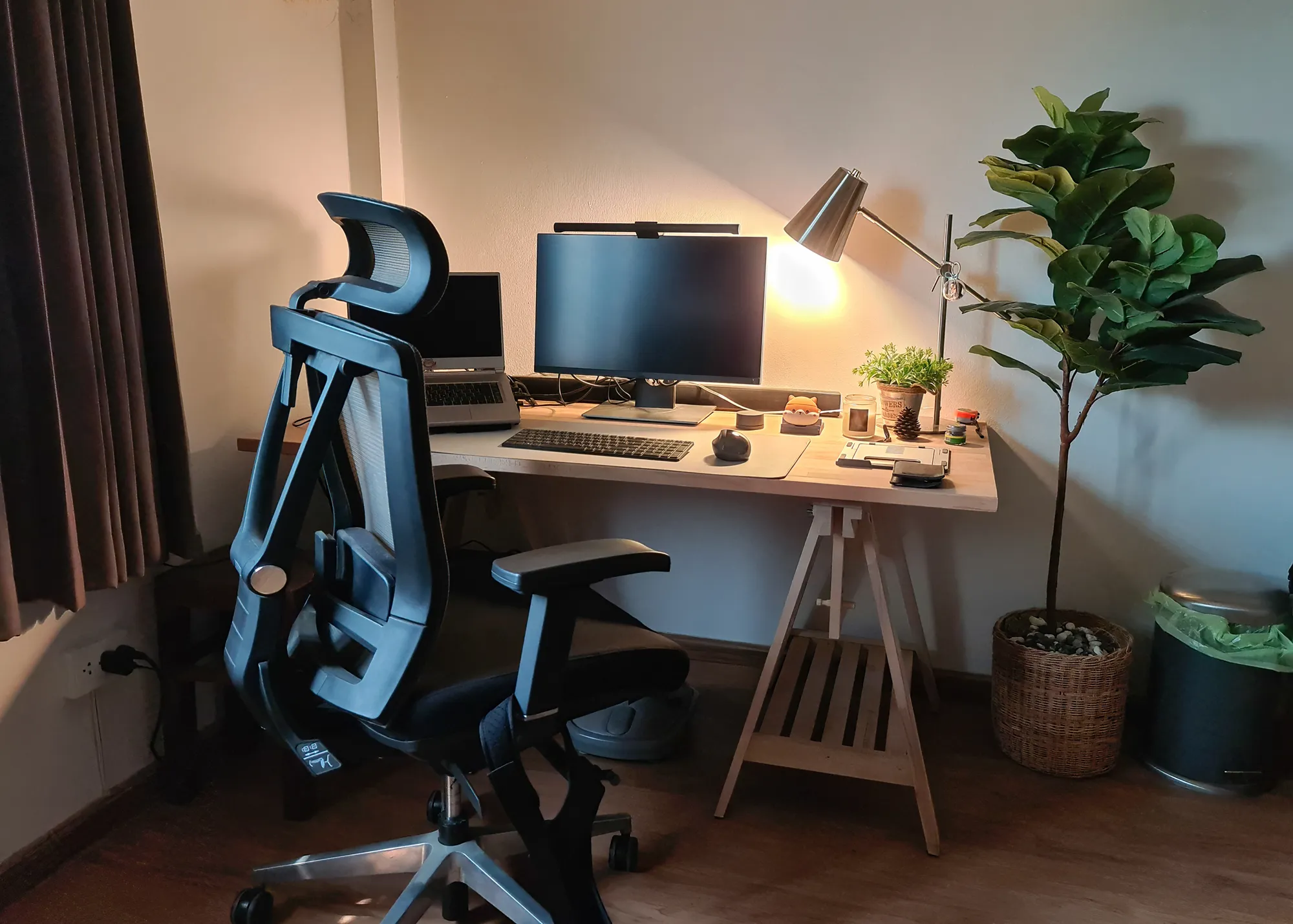
An office chair can feel fine for a few minutes in a showroom and still sit awkwardly at your desk. Seat depth affects whether you can settle against the backrest. The arms need to support your forearms without catching on the desk edge when you pull in to type. Both details depend on the person and the workstation.
A chair also has to accommodate what happens between stretches of typing. You might recline for a call, turn toward a second screen or draw the arms inward while reading on a tablet. A wide range of adjustment is useful if you’ll make those changes. A compact chair with a simpler recline may be easier to live with in a smaller office.
These chairs take different approaches to that fit. Some pair a cushioned seat with a mesh back, while one uses mesh for both and adds a headrest. We look at seat and arm movement alongside dimensions, caster options and available parts, the details that determine whether a chair works at your desk now and can stay there for years.
Top Picks: Ergonomic Chairs for Home Offices
We evaluated these office chairs using The Hearthful Standard, which considers materials, design, everyday use, durability, and the clarity of product information. We selected Steelcase Gesture for its broad arm movement and adjustable seat depth, and Ergohuman Gen2 for its mesh seat, mesh back, and extensive fit adjustments. Steelcase Series 1 retains seat-depth and lumbar adjustments in a more compact chair. Branch combines a cushioned seat with a mesh back and adjustable lumbar support at a lower price.
Note: Some of the links in this post are affiliate links. If you decide to buy through them, I may earn a small commission, at no extra cost to you. As an Amazon Associate, I earn from qualifying purchases. Thanks for supporting The Hearthful Home.

For switching between a keyboard and handheld devices
Steelcase Gesture
Broad arm movement, adjustable seat depth, and recline controls suit a workstation where you switch between a keyboard, mouse, and handheld devices. The linked version uses Graphite Gray fabric and carpet casters.

Adjustable mesh with a headrest
Eurotech Ergohuman Gen2
The ME7ERG-GEN2 combines a mesh seat and back with a headrest, seat-depth adjustment and adjustable arms. Its extensive controls require a deliberate setup, and its dimensions and back-lock descriptions need careful model matching.

Compact chair with weight-activated recline
Steelcase Series 1
Series 1 combines seat-depth and lumbar adjustment with weight-activated recline in a compact frame. The linked Licorice + Night Owl Era version has carpet casters; compare the selected finish, arm configuration and floor type before ordering.
Mesh back with a cushioned seat
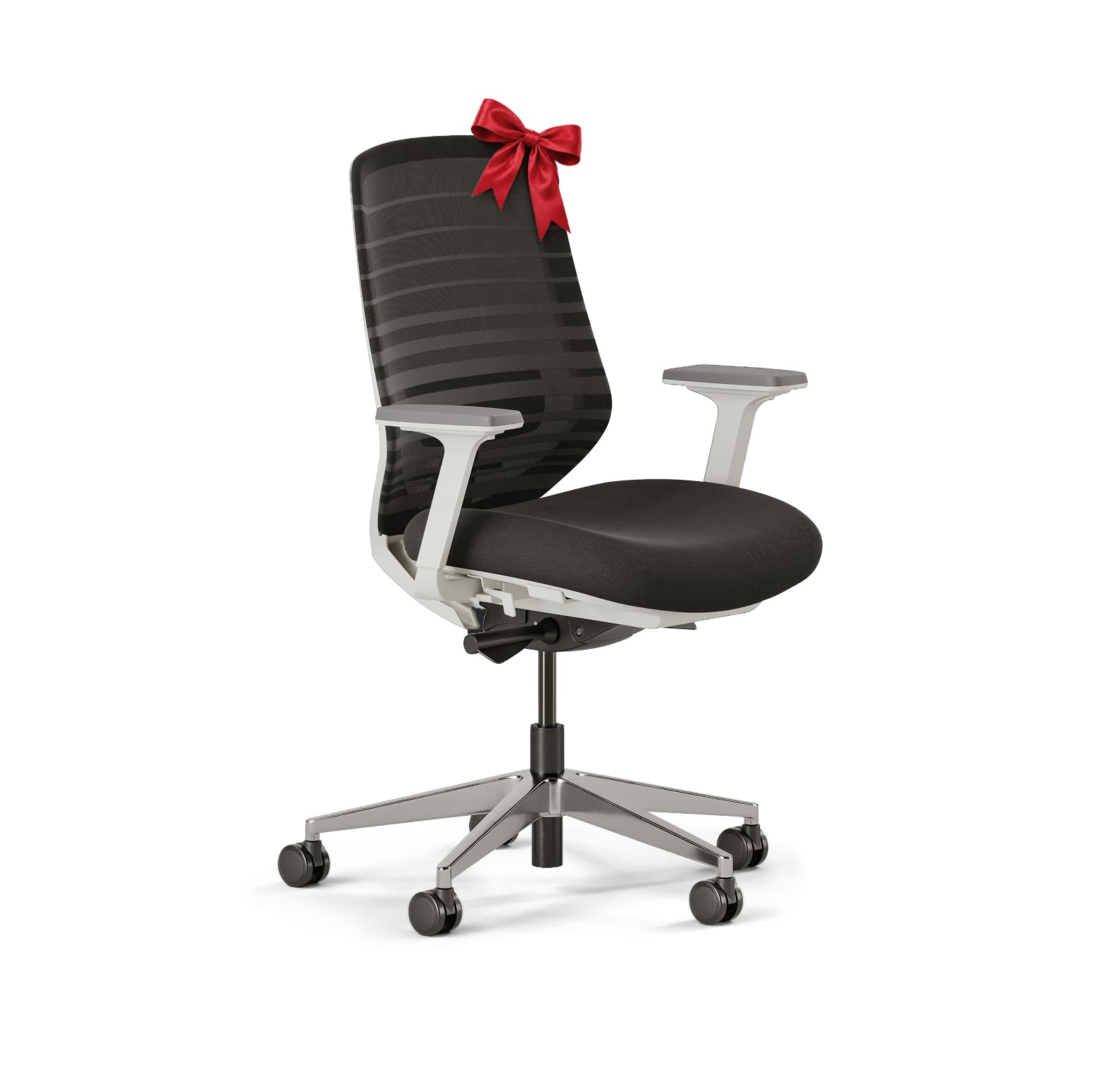
Branch Ergonomic Chair
The Branch Ergonomic Chair combines a mesh back with a cushioned seat, adjustable seat depth and lumbar support. Its removable three-way arms and synchronized tilt cover the main setup choices for a home office.
What Actually Matters in an Ergonomic Chair
An ergonomic chair has to fit the body and the workstation before upholstery, styling, or price becomes meaningful. The most useful buying checks are the ones that determine whether you can sit fully against the backrest, keep your feet supported, place your arms near the keyboard and mouse, and change posture without rebuilding the setup.
Start With Seat Fit
Compare the minimum and maximum seat height, usable seat-depth range, seat width, lumbar position, and armrest range with your own seated measurements. A chair can have dozens of controls and still miss the user if the seat remains too deep, the lumbar lands too high, or the arms cannot come inward far enough. The office chair size guide explains which published dimensions matter most before buying.
OSHA’s computer-workstation chair guidance also emphasizes adjustability and fit rather than one fixed chair shape. Published measurements are a starting filter, not a substitute for checking how the chair meets the user.
Make the Chair Work With the Desk
Armrests, the chair base, and the seat height all have to work with the desk. Pads that sit too high can lift the shoulders, while pads that are too wide or too large can keep the chair from moving close enough to the keyboard. The seat depth, lumbar support, and armrests guide explains how those contact points affect one another.
Before choosing an adjustable chair, pull your current chair in until the keyboard is within comfortable reach. Note whether the arms hit the desk first. Broad arm adjustment is a reason to look at the Steelcase Gesture. A smaller workstation can make the compact Series 1 worth trying first. Compare adjustment ranges against that point of contact while your seat is at your working height.
Footprint matters too. A compact chair may fit under a desk and turn more easily in a small room, while a high-back chair with a wide base and headrest may dominate the same space. The task chair vs all-day chair guide helps separate the controls needed for short work blocks from those that become more useful at a primary workstation.
Choose the Support and Movement Style
Mesh and cushion behave differently. Mesh depends on even tension and a frame that does not create concentrated contact, while a cushioned seat depends on foam contouring, resilience, and upholstery. The mesh vs cushion office chair guide compares airflow, pressure distribution, edge contact, and aging tradeoffs.
Recline quality matters because useful seating should allow movement instead of locking the user into one position. The mechanism should support body weight without dropping backward or forcing the user upright, and the backrest should remain useful as the chair moves. A headrest is most relevant during recline; its presence alone does not make a chair a better fit.
Check Replacement Parts and Warranty Coverage
Long-term value depends on the cylinder, recline mechanism, armrest stability, foam or mesh wear, caster availability, replacement parts, and the components actually covered by the warranty. A long headline warranty is strongest when the terms, seller requirements, labor, surface coverage, and exclusions are easy to verify.
After delivery, use the ergonomic chair fit checklist at the actual workstation while the return window is still open. The right chair should fit the body, clear the desk, support useful movement, and remain easy to reset after normal changes in posture.
How We Evaluate Ergonomic Chairs
Our recommendations in this guide are research-based. Manufacturer documentation, official support materials, and independent sources form the evidence base for this comparison.
Body size, chair adjustments, desk height, and the delivered price all affect the fit.
Manufacturer specifications and warranty claims remain attributed and linked to the relevant source trail. Independent guidance is used where it helps explain workstation fit, and model, seller, or warranty conflicts remain visible rather than being silently resolved.
Materials
We compare the disclosed seat foam, mesh, upholstery, frame, base and arm-pad construction. A material name matters when it explains the contact surface, cleaning routine or a documented construction difference.
Design & Function
We examine seat-height and depth ranges, lumbar positioning, arm movement and recline settings. The useful question is whether those controls work together to place the user at the intended workstation.
Use & Interaction
We consider control reach, desk clearance, setup order, footprint and maintenance. Published geometry helps narrow the fit, while the actual return-period check determines whether the chair meets the individual user.
Durability & Longevity
We review frame and mechanism documentation, replacement components and warranty terms. Coverage for surfaces, labor and different work schedules can matter as much as the headline term.
Transparency & Trust
We check how clearly the company identifies dimensions, adjustment ranges, materials, configurations and ownership support. Conflicting model descriptions remain visible so the buyer can verify the selected version.
A Closer Look at Each Pick
For switching between a keyboard and handheld devices
Steelcase Gesture
Choose Gesture for a primary workstation where its broad arm movement, seated adjustment knobs and multiple recline stops will be used regularly. Its main tradeoffs are price, size and configuration complexity; paying for that range makes less sense when a smaller chair already fits the user and desk.
Price and availability last updated: 2026-11-25 at 19:51.
Materials
The selected Gesture has Graphite Gray fabric upholstery over a foam seat with flexible edges and adaptive bolstering. Steelcase documents several other back and surface configurations, so leather, vinyl and optional 3D knit should not be assumed for this fabric listing. The upholstered contact surface is a practical distinction from Ergohuman’s suspended mesh seat.
Design & Function
The Steelcase Gesture has 3D LiveBack movement, built-in lower-back firmness, two seated controls for height, depth, tension, and variable back stops, and 360-degree arms that move through a broad height, width, depth, and pivot range. Core Equalizer support is built into the backrest. Adjustable lumbar support and an integrated headrest are optional.
Use & Interaction
The arm system is the main reason to choose Gesture. The pads can move inward for keyboard and mouse work, spread for broader positions, or reposition around handheld devices. The controls remain reachable while seated, but the chair still has to clear the desk and the arm pads have to land at a useful height without raising the shoulders.
Durability & Longevity
Steelcase rates Gesture for users up to 400 pounds and lists a 12-year multi-shift warranty with parts and labor under its stated terms. The company also publishes adjustment, service, finish, sustainability, and remanufacturing information. The current Steelcase warranty should still be checked against the seller and delivery region.
Transparency & Trust
Gesture has one of the strongest documentation trails in the group. Steelcase clearly identifies standard and optional features, upholstery choices, adjustment behavior, environmental documents, warranty coverage, and model variations. The main buying risk is configuration mismatch: lumbar support, headrest, back style, base finish, and upholstery are not identical across listings.
- Exceptional arm range for keyboard, mouse, tablet, and phone use.
- Adjustable seat depth and controlled recline behavior.
- Broad surface, back, lumbar, and headrest configurations.
- 400-pound rating and strong 12-year multi-shift warranty.
- High purchase price.
- Larger physical presence than compact task chairs.
- Adjustable lumbar support and headrest depend on configuration.
- Integrated lumbar feel may not suit users who want a pronounced movable pad.
Adjustable mesh with a headrest
Eurotech Ergohuman Gen2
Choose Ergohuman Gen2 for an all-mesh high back, headrest and broad control range. Measure its footprint and seat geometry first, then allow time to set the controls at the desk. Its larger frame, setup work and conflicting back-lock descriptions are the main tradeoffs to resolve before ordering.
Price and availability last updated: 2026-11-25 at 19:51.
Materials
The ME7ERG-GEN2 uses mesh across the seat, backrest and headrest with black structural components and a chrome-finish frame. A suspended mesh seat has a surrounding frame instead of a foam-filled cushion. Compare the usable sitting area and perimeter clearance with your seated measurements, especially if your legs will sit close to the frame.
Design & Function
Eurotech’s ME7ERG-GEN2 page lists seat-depth, back-height, recline-tension and synchro-tilt adjustments, along with arm height, width, depth and pivot. The headrest adds another adjustable contact point above the backrest. This is a broader set of independent settings than the compact and value chairs here, but the family overview and retailer descriptions differ on the back-lock positions.
Use & Interaction
Establish seat height and depth first, then adjust the back, arms, headrest and recline at the actual desk. Eurotech lists the seat at 20.67 inches wide and 19.69 inches deep, with a seat-height range of 17.83–21.38 inches. Those figures help screen for fit, but the published seat depth is not a complete minimum-to-maximum slider range.
Durability & Longevity
Eurotech’s limited-lifetime policy covers components for the original purchaser, with five years for upholstery and foam. Its standard terms assume a 40-hour workweek and a 275-pound limit unless otherwise stated, and exclude transportation and labor costs. Keep the exact model, seller and receipt with the order so those conditions can be checked before a claim.
Transparency & Trust
The exact ME7ERG-GEN2 has a manufacturer page, dimension sheet and assembly instructions, but its model trail still needs care. Eurotech’s family overview describes an infinite-position tilt lock, while specialist listings describe three back-angle positions; generic ME7ERG pages also circulate beside Gen2 listings. Confirm the supplied generation and controls with the seller rather than combining specifications from those pages.
- Broad adjustment range across the seat, lumbar, arms, recline, and headrest.
- All-mesh construction promotes airflow.
- Seat slider and adjustable back support expand the fit range.
- Replacement components are available through specialist sellers.
- More setup complexity than the other chairs in this guide.
- Back and lumbar contact need to align with the individual user.
- Large high-back frame takes up more room.
- Model names, dimensions, returns, and warranty terms require careful verification.
Compact chair with weight-activated recline
Steelcase Series 1
Choose Series 1 when a compact footprint, adjustable seat depth, useful arm movement, and established parts and warranty support matter more than a high back or premium recline. It preserves the core fit controls at a lower price, with the tradeoff that its backrest and recline adjustment are more limited than Gesture’s.
Price and availability last updated: 2026-11-25 at 19:02.
Materials
The selected Licorice + Night Owl Era chair combines the Licorice 3D Microknit back with a fabric-covered adaptive foam seat. Steelcase identifies Licorice in its Microknit finish list; the separate Air Back uses a different open polypropylene pattern. Match the back and seat finish to the selected offer rather than transferring Air Back claims to this version.
Design & Function
Steelcase lists adjustable seat height and depth, standard adjustable lumbar support, four-direction arms and weight-activated recline with a boost setting. Full recline and an upright back stop cover the main movement choices for keyboard and mouse work. Check the arms shown on the selected marketplace configuration, since listings may group different versions.
Use & Interaction
The weight-activated mechanism reduces setup compared with chairs that require separate tension and lock tuning. Its compact footprint and adjustable arms suit smaller workstations, but taller users and people who want a high back, headrest, or deeper recline should compare the published geometry before assuming the smaller frame will fit.
Durability & Longevity
Steelcase rates the chair for users up to 400 pounds and lists a 12-year multi-shift warranty with parts and labor under the stated terms. Established service documentation and replacement channels strengthen the ownership path. As with Gesture, warranty coverage should be checked against the current regional terms and seller.
Transparency & Trust
Steelcase clearly documents the 3D Microknit and Air Back choices, lumbar and arm options, seat movement, recline behavior, surfaces, sustainability information, and warranty. Buyers still need to confirm the exact back, arm, base, and upholstery configuration because marketplace listings can combine different versions under the same Series 1 name.
- Compact footprint works well in home offices.
- Adjustable seat depth, lumbar support, and available four-direction arms.
- Simple weight-activated recline setup.
- 400-pound rating and strong 12-year multi-shift warranty.
- Shorter backrest than the larger chairs in this guide.
- Recline system is less configurable than Gesture or Ergohuman.
- Back and arm configurations vary by listing.
- Premium price relative to basic compact task chairs.
Mesh back with a cushioned seat
Branch Ergonomic Chair
Choose the Branch Ergonomic Chair when meaningful seat, lumbar, arm, and tilt adjustment matters more than a premium mechanism or commercial service network. It is a practical step up from a basic task chair, but the 18-inch minimum seat depth, 275-pound capacity, and shorter component-and-fabric coverage should be part of the value calculation.
Price and availability last updated: 2026-11-25 at 19:25.
Materials
Branch lists a double-woven nylon mesh back, high-density foam cushion and anodized aluminum base. The hybrid construction gives the back and seat different contact surfaces. Check both the mesh perimeter and cushion dimensions against your seated position instead of assuming either material determines comfort on its own.
Design & Function
Branch documents eight adjustment points, including seat height and depth, removable height-adjustable lumbar support, tilt and tilt tension, and three-way removable armrests. The current chair also uses a synchronized mechanism and offers an optional headrest. This is a useful home-office range, though it does not match the deeper arm and recline systems of Gesture or Ergohuman.
Use & Interaction
The published range is 17–21 inches for seat height and 18–22 inches for seat depth, with a 25-inch chair width before the arms extend outward. Shorter users should compare the minimum depth with their seated leg measurement, and every buyer should confirm that the arms and 27.6-inch base can clear the intended desk.
Durability & Longevity
Branch lists a 275-pound capacity and a seven-year parts-and-components warranty, with three years for fabrics. That provides a defined support path for ordinary home-office ownership, although it is shorter than Steelcase’s multi-shift coverage. The policy excludes normal wear and applies to the original purchaser through Branch or an authorized reseller; keep registration or proof of purchase for an eligible Amazon order.
Transparency & Trust
Branch publishes overall dimensions, seat ranges, arm dimensions, materials, weight, capacity, assembly information, certification claims, accessories, and a downloadable specification sheet. Its warranty policy also distinguishes direct and authorized third-party purchases; Amazon buyers may need registration or proof of purchase, so the linked configuration and seller should be confirmed.
- Meaningful seat, lumbar, armrest, and tilt adjustments for the price.
- Mesh back and cushioned seat balance airflow and padding.
- Published dimensions and specification sheet simplify fit checks.
- Seven-year parts-and-components warranty for the current chair.
- Fewer arm and recline adjustments than Gesture or Ergohuman.
- Minimum seat depth may remain long for some shorter users.
- Lower weight capacity than the Steelcase chairs.
- Three-year fabric coverage is shorter than the component term.
Tips for Better Chair Setup
Even a well-designed chair can feel wrong when the setup is built in the wrong order. Establish the relationship between your feet, seat, backrest, armrests, desk, keyboard, mouse, and monitor before deciding whether the chair fits.
Start With Seat Height and Foot Support
Raise the chair enough to reach the keyboard without lifting your shoulders, then confirm that your feet remain supported and the front edge of the seat does not create concentrated pressure under the thighs. Add a stable footrest when a fixed desk requires more chair height than your legs can otherwise support.
Adjust Seat Depth Before Lumbar Support
Sit fully against the backrest and move the seat pan until most of the thighs are supported with clearance behind the knees. Set lumbar height or depth only after the seat position is established; a seat that pushes the body forward can make a correctly shaped backrest feel too weak or too far away.
Set the Armrests at the Actual Desk
Place your hands on the keyboard and mouse before adjusting armrest height, width, depth, or pivot. The shoulders should remain relaxed, the upper arms should stay near the torso, and the pads should not prevent the chair from moving close enough to the desk.
Tune Recline for Movement
Set recline resistance so the backrest supports your weight without dropping away or forcing you forward. Use upright positioning for focused input work, modest recline when the task allows it, and regular changes in posture rather than trying to hold one rigid angle all day.
Align the Rest of the Workstation
A chair cannot correct a keyboard that is too high, a mouse placed too far away, or a monitor that encourages leaning forward. Keep the input devices within easy reach and align the screen with your seated position.
Recheck the Chair During the Return Period
Retest knee clearance, lumbar contact, armrest alignment, recline, stability, and desk access after several normal work sessions. Also check seller-specific return rules, assembly requirements, and warranty registration before the trial period ends; those policies can matter as much as the chair’s feature list when the fit is uncertain.
Ergonomic Chair FAQs
Which ergonomic chair is best for a home office?
The best choice is the chair whose usable dimensions and adjustments overlap with the user and desk. Gesture favors broad arm movement and premium recline; Ergohuman favors an all-mesh high back and extensive tuning; Series 1 favors compact everyday fit; Branch favors a lower price with the major adjustment categories.
Are expensive ergonomic chairs worth it?
A higher price can buy a wider adjustment range, additional recline settings, stronger warranty coverage, more configuration choices, and a better replacement-part path. It does not guarantee fit. A lower-priced chair that matches your dimensions can be a better purchase than a premium chair whose seat, lumbar, or arms miss the body.
Is mesh or cushion better for long work sessions?
Neither is universally better. Mesh usually provides more airflow and a firmer suspended surface, while cushioning usually provides a more planted feel and broader initial pressure absorption. Material quality, frame contact, foam resilience, seat geometry, and body fit matter more than the category alone. See the mesh vs cushion office chair guide for the full comparison.
How do I know whether an ergonomic chair fits me?
You should be able to sit fully against the backrest with supported feet, clearance behind the knees, useful lumbar contact, relaxed shoulders, and easy access to the keyboard and mouse. The chair should remain supportive when you recline, shift, and return upright. Use the ergonomic chair fit checklist for the complete test.
Which ergonomic chair adjustments matter most?
Seat height is essential, but seat depth, lumbar placement, armrest range, and recline behavior often determine whether a chair can adapt beyond average proportions. The ergonomic chair adjustments guide explains how to prioritize those controls.
How do I choose the right office chair size?
Compare the minimum and maximum seat height, usable seat depth, seat width, lumbar position, arm range, and desk clearance with your own seated measurements. A recommended height band is only a rough filter. The office chair size guide explains how to measure before buying.
Should I sit perfectly upright all day?
No single posture should be held throughout the day. Use an upright position for focused keyboard and mouse work, recline when the task allows it, shift naturally, and stand or walk at regular points. The chair should make those transitions easier rather than holding the body in one fixed angle.
Do I need a headrest?
A headrest is most useful during recline. It should meet the back of the head without pushing it forward during upright work. Height, angle, and depth range matter more than simply having one, and some users may prefer a chair without a headrest at the keyboard.
Should I use a footrest?
A footrest helps when the chair must be raised to match a fixed desk and the feet no longer remain supported. It can correct that chair-to-desk mismatch, but it cannot correct a seat pan that is too deep, lumbar support that lands in the wrong place, or arms that cannot align with the workstation.
How long should an ergonomic chair last?
There is no single lifespan for every chair. Usage, body weight, mechanism quality, foam or mesh construction, maintenance, warranty coverage, and replacement-part availability all matter. Cylinder drift, uneven foam compression, sagging mesh, loose arms, unstable recline, frame movement, or unavailable parts are more useful replacement signals than a fixed number of years.
Important: This article provides general information, not individualized medical, safety, installation, legal, or other professional advice. Product specifications, instructions, and safety information can change; verify current information with the manufacturer and consult an appropriately qualified professional when needed. See our Terms and Conditions for additional information.