
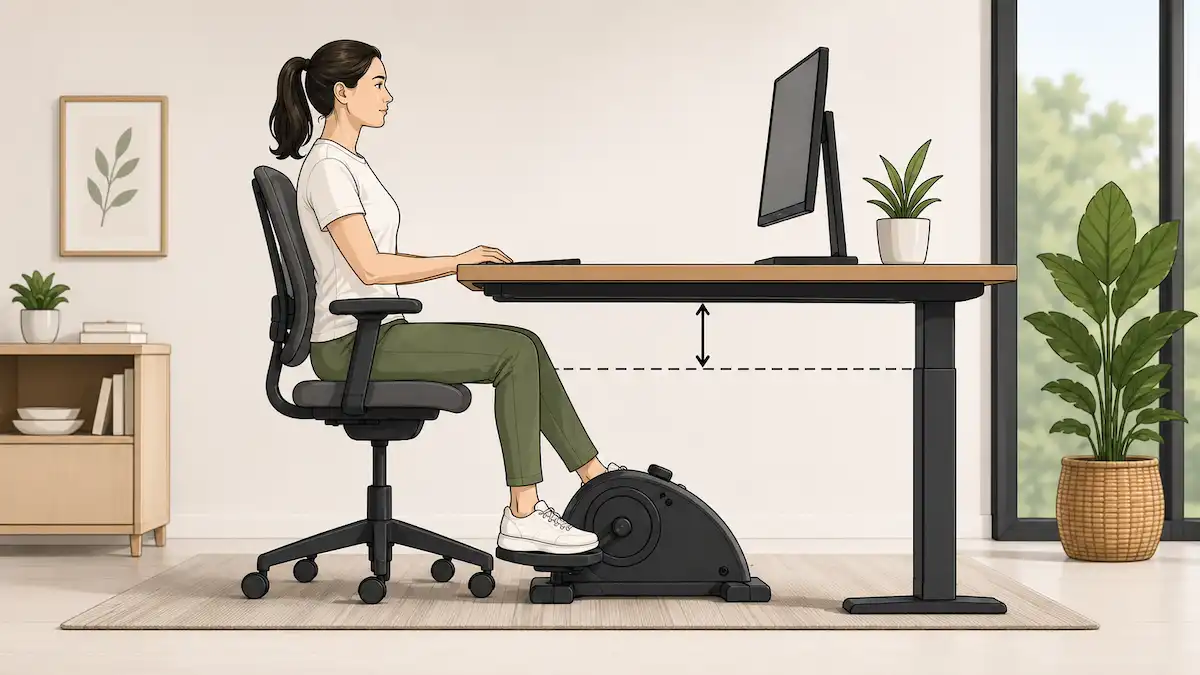
Measure from the floor to the lowest obstruction above your knees, then compare it with your highest knee position while pedaling in your usual chair and shoes. A keyboard tray or center drawer can be the limiting point even when the machine itself slides easily under the desk.
Cubii recommends about 2 to 3 inches between the knees and the desk for its seated ellipticals. For a circular-pedal bike, use the fit guidance for the exact machine. That extra room helps account for shoes, chair adjustments, small changes in machine position, and the fact that your pedaling motion will not remain perfectly identical throughout the day.
Measure to the actual underside of the desk, not the top of the desktop. Drawers, support rails, keyboard trays, cable raceways, and thick desk aprons can quietly remove several inches from the space your knees can use.
In this guide, under-desk bike includes both compact circular-pedal exercisers and seated under-desk ellipticals. Their pedal paths differ, but both need enough vertical, horizontal, and fore-and-aft space to work without forcing the rest of your workstation out of position. For model recommendations and the wider buying process, see the under-desk bike buying guide.
How Much Under-Desk Bike Clearance Do You Actually Need?
For a Cubii elliptical, compare your result with its 2- to 3-inch recommendation. On a different model, check its instructions and allow room for changes in your seated position. If your knee reaches or passes the desk underside during the test, the setup does not fit.
The useful calculation is simple: subtract your highest knee height during the pedal stroke from the height of the lowest desk obstruction. The number left over is your usable vertical buffer. This is much more informative than comparing the overall height of the machine with the advertised height of the desk.
A height-adjustable desk can often create the missing margin without forcing a major chair change. With a fixed-height desk, maximum pedal or step height becomes much more important because there may be no comfortable way to compensate for a poor match.
Do not treat a 2- or 3-inch result as the only fit test. The machine must also sit far enough beneath the desk, leave room between desk supports, remain stable on the floor, and let you reach the keyboard while keeping your back supported.
Measure Your Setup Before You Compare Models
Set your chair to the position you normally use for typing. Find the product’s published maximum pedal height or maximum step height, then place one foot on a stable stack of books or blocks that matches that measurement. Position the stack where the pedal would sit, keep your back against the chair, and measure from the floor to the top of your raised knee.
Next, measure from the floor to the lowest desk obstruction along the same knee path. Enter those two measurements in the calculator below. The result shows the vertical buffer left between your knee and the desk.
Under-Desk Bike Clearance Calculator and Fit Checklist
Enter the height of the lowest desk obstruction and the highest point of your knee during a real or simulated pedal stroke. The result is your usable vertical buffer.
Enter both measurements to calculate your knee-clearance buffer.
| Fit Check | How to Measure It | Practical Target | Why It Matters |
|---|---|---|---|
| Lowest desk obstruction | Measure from the floor to the lowest drawer, crossbar, keyboard tray, cable raceway, or desktop underside where your knees will travel. | Use the true underside height, not the height of the desktop surface. | A modest apron or crossbar can remove the exact space your knees need at the top of the stroke. |
| Highest knee point | At your normal chair setting, place one foot on a stable stack that matches the product’s published maximum pedal or step height, then measure from the floor to the top of your knee. | Repeat with normal footwear and the stack positioned where the machine would sit. | This captures your leg proportions, chair height, footwear, and the product’s pedal geometry in one measurement. |
| Vertical knee buffer | Subtract the highest knee height from the lowest desk obstruction height. | Cubii suggests about 2 to 3 inches (5.1 to 7.6 cm) above the knees for its ellipticals. | Extra room helps prevent contact when you shift in the chair, change shoes, or pedal less perfectly than during the test. |
| Clear width | Measure between desk legs, pedestals, storage units, and other side obstructions. | Use 20 inches as a general workstation baseline, then confirm the frame, pedals, and shoes have additional room. | A unit can fit vertically but still crowd your feet or frame between narrow supports. |
| Knee-level depth | Measure from the desk’s front edge to the first obstruction at knee height. | At least 17 inches is a general workstation baseline. | The machine must sit far enough beneath the desk that you can reach the keyboard without leaning forward. |
| Foot-level depth | Measure from the desk’s front edge to the first obstruction near the floor. | At least 24 inches is a general workstation baseline; longer machines may need more. | Elliptical frames and rear stabilizers can use more fore-and-aft space than the pedal area suggests. |
| Working posture | Complete the mockup while checking keyboard reach, back support, shoulder position, and foot support when you stop pedaling. | No leaning, raised shoulders, unsupported feet, or loss of backrest contact. | A machine that fits only after compromising the rest of the workstation is not a good fit. |
The 2–3 inch knee buffer follows Cubii’s fit guidance. The width and depth figures are OSHA workstation-clearance baselines, not guarantees that a particular machine will fit.
Treat the result as a screening test rather than a guarantee. A borderline setup should still be tested through repeated pedal strokes, because normal movement, a thicker shoe, a slightly different chair position, or the machine creeping forward can consume a small remaining buffer.
If the result looks comfortable, continue through the checklist rather than stopping at vertical clearance. A machine can clear your knees and still be too wide, too long, or too difficult to position beneath the desk without changing your working posture.
Measure the Desk Underside, Not the Desktop Surface
Desk listings usually emphasize the height of the work surface, but your knees never interact with the top of the desk. They interact with the underside, which may sit noticeably lower after desktop thickness, drawers, aprons, support rails, and mounted accessories are included.
Measure from the floor to the lowest obstruction along the path your knees will actually follow. A drawer at the front edge may not matter if the machine sits farther back, while a central crossbar several inches behind the edge may become the first point your knee reaches.
Take measurements at more than one depth beneath the desk. Under-desk bikes can move slightly as the chair position changes, and the most restrictive obstruction may not be directly above the machine when it is first placed.
Mounted keyboard trays and cable-management hardware deserve special attention because they can occupy the center of the workspace. Measure the finished workstation, not the empty desk as it appeared before accessories were installed.
Maximum Pedal Height Matters More Than Overall Machine Height
Overall product height describes the tallest part of the machine, which may be the resistance housing, display, handle, motor cover, or protective casing. It does not necessarily describe how high your foot travels or how far your knee rises during use.
The more useful specification is maximum pedal height, maximum step height, or the highest point in the pedal path. Two machines with similar overall dimensions can create noticeably different knee positions because their cranks, pedals, step mechanisms, and frames are arranged differently.
A relatively small difference in maximum pedal height can completely change whether the same user clears the same desk. Products that appear interchangeable on a basic dimensions chart may therefore behave very differently once the pedals are moving.
Before buying, look for maximum pedal height, maximum step height, crank length, pedal-path dimensions, or a manufacturer-stated minimum desk height. If the listing provides only overall dimensions, contact the manufacturer or choose a seller with a practical return window rather than assuming the machine will fit.
Circular-Pedal Bikes and Ellipticals Use Clearance Differently
A circular-pedal bike moves each foot around a crank, creating a distinct high point in the rotation. Crank length, the height of the crank center, pedal thickness, and where the machine sits relative to the chair all influence the resulting knee arc.
A seated under-desk elliptical moves the feet through a flatter forward-and-back path on many models, which can reduce knee rise. That does not mean every elliptical needs less room. Some motorized or higher-step designs raise the pedals substantially, and their longer frames may require more space beneath the desk even when vertical clearance is adequate.
Compare the published pedal path of the exact model rather than assuming one product category will always fit better. A low-profile circular bike may work beneath a desk that rejects a taller elliptical, while a low-step elliptical may fit a user whose knees rise too high on a conventional crank.
The mockup method remains useful for both categories. Match the stack height to the product’s highest pedal position and test your own knee height at the chair setting you intend to use.
Chair Height Can Change the Knee Path
Changing chair height changes the relationship between your hips, knees, and pedals. Raising the seat can sometimes open the knee angle and create additional clearance, but it also raises your upper body relative to the keyboard and may leave your feet unsupported whenever you stop pedaling.
Do not create clearance by sacrificing the rest of the workstation. Your back should remain supported, your shoulders should stay relaxed, and the keyboard and mouse should remain reachable without leaning forward or bending the wrists sharply.
If a higher chair setting is necessary, check whether the desk can also be raised or whether a stable footrest is needed when the bike is not in use. A machine that fits only while you perch forward on the chair or lose contact with the backrest is not truly compatible with the workspace.
Run the clearance test at the chair height you can actually maintain for normal work. A theoretical fit produced by an uncomfortable chair position is not a useful result. Our chair fit checklist helps you check foot support, backrest contact, and keyboard reach after changing the seat height.
Width and Depth Matter Alongside Knee Clearance
Vertical clearance receives the most attention because knee contact is immediate, but an under-desk bike also needs enough width and depth to sit in the correct position. OSHA’s general workstation guidance uses approximately 20 inches of clear width, 17 inches of knee-level depth, and 24 inches of foot-level depth as baseline space for seated work.
Those figures are not an under-desk bike standard. The machine itself may be close to the available width, leaving little room between desk pedestals, storage cabinets, pedals, shoes, or the user’s natural stance.
Depth affects both fit and working posture. If a rear stabilizer, wall, modesty panel, cable box, or storage unit prevents the machine from moving far enough beneath the desk, you may have to push the chair backward and reach for the keyboard.
A machine that clears your knees but forces that position still does not fit well. Check the full frame dimensions and the position of the pedals rather than measuring only the machine’s central housing.
Desk Design Can Matter More Than Published Desk Height
Height-adjustable standing desks are usually the easiest match because the work surface can be raised enough to create knee room while the chair remains in a comfortable position. After raising the desk, recheck keyboard and monitor placement rather than assuming the entire workstation should move upward unchanged.
A fixed-height desk with a completely open underside can work well with a low-profile machine, especially when the desktop is relatively thin. The same published desk height may perform very differently when a drawer, apron, crossbar, or keyboard tray occupies the center.
Traditional desks with deep drawers or low front aprons can be poor candidates even when there appears to be plenty of open floor space. In those cases, choosing a shorter pedal path may not solve the problem because the obstruction sits directly where the knee must travel.
Measure the workspace you actually intend to use. A general claim that a machine fits most desks cannot account for the construction of your desk, the height of your chair, or your body proportions.
How to Verify Under-Desk Bike Fit Before Buying
Use this process before relying on a product recommendation or dimensions chart. It takes a few extra minutes, but it is much easier than assembling and returning a machine that never had enough room.
- Measure from the floor to the lowest obstruction beneath the desk where your knees will travel.
- Set your chair to the height and distance you normally use for typing.
- Find the product’s maximum pedal height or maximum step height as well as its overall dimensions.
- Build a stable foot-height mockup using books or blocks that matches that published pedal measurement.
- Place your foot on the mockup in normal footwear and measure the highest point of your knee.
- Subtract the knee measurement from the desk-underside measurement and compare the remaining space with the maker’s fit guidance.
- Check clear width, knee depth, foot depth, keyboard reach, back support, and whether the machine can remain in position without sliding or rocking. Our guide to why under-desk bikes slide or wobble explains the frame, stabilizer, foot, and floor-contact details that affect stability.
Repeat the mockup with both feet and try slightly different machine positions. The best location may place the bike farther beneath the desk than expected, and that change can reveal a crossbar or depth restriction that was not obvious during the first measurement.
If the manufacturer does not publish maximum pedal or step height, do not substitute total machine height without understanding what that number represents. Ask for the missing specification or wait until the product can be tested with a realistic return option.
The Bottom Line on Under-Desk Bike Clearance
The number that matters is not the height of the desk or the height of the machine by itself. It is the space left between your knee at the highest point of the pedal stroke and the lowest obstruction beneath the desk.
Confirm that your knees clear the lowest obstruction throughout a full stroke in your usual shoes. Then verify that the machine also has enough width and depth and that any chair adjustment preserves keyboard reach, back support, and a comfortable seated position.
Adequate clearance lets you pedal without repeatedly moving the chair or machine. A tight fit leaves little room for changes in your position, shoes, or pedal stroke.
Once you know the setup physically fits, the next questions are whether the equipment suits your routine and whether its low-end resistance is appropriate for working. See whether under-desk bikes are worth it for sedentary work and how much resistance an under-desk bike needs for those decisions.
The under-desk bike buying guide can then help you compare circular-pedal bikes, seated ellipticals, resistance systems, stability, noise, and portability.
Important: This article provides general information, not individualized medical, safety, installation, legal, or other professional advice. Product specifications, instructions, and safety information can change; verify current information with the manufacturer and consult an appropriately qualified professional when needed. See our Terms and Conditions for additional information.