
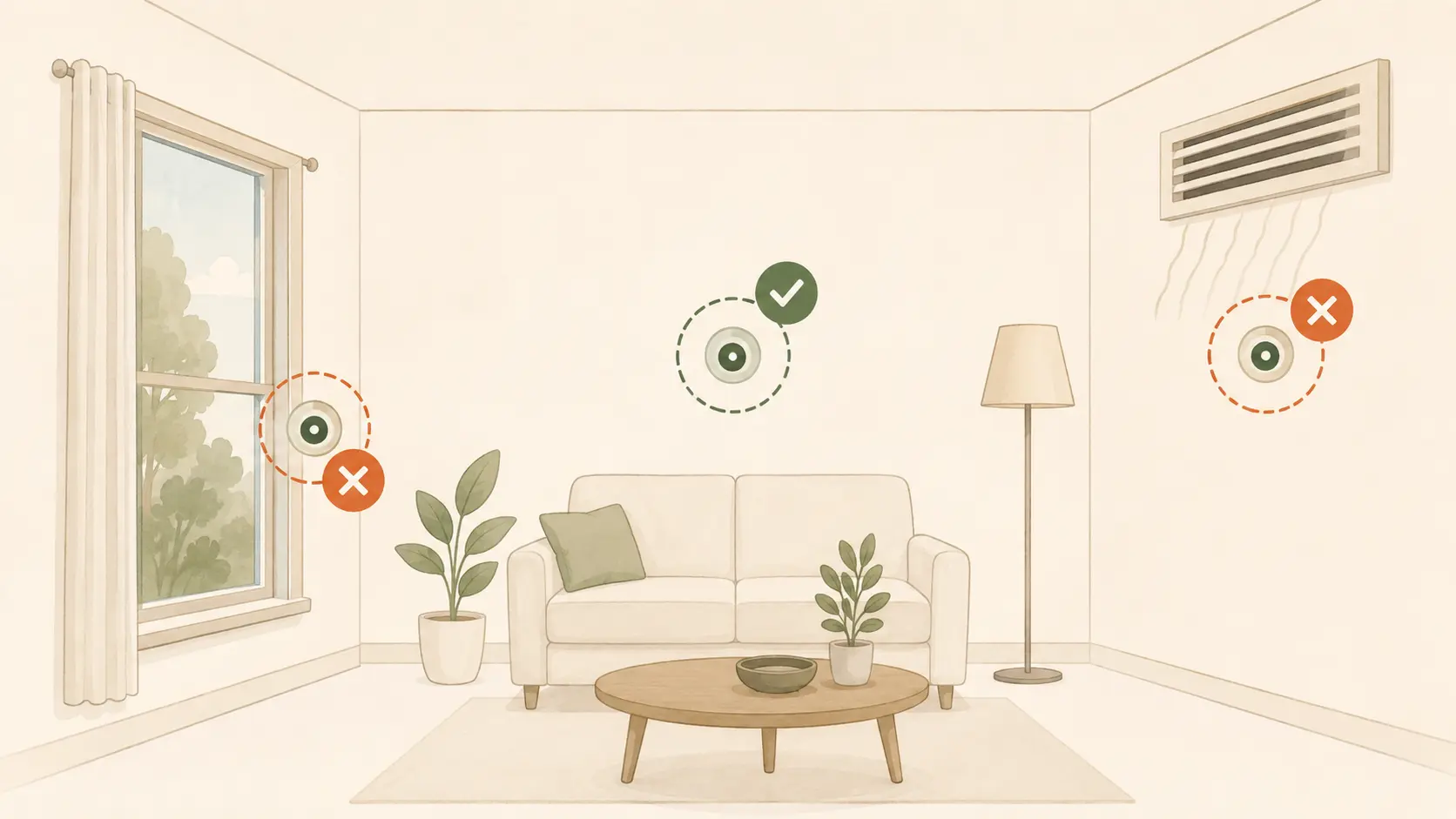
Place a portable air quality monitor in the room you want to understand, at roughly breathing-zone height with open airflow around it. For general room readings, keep it far enough from localized sources that one small pocket of air does not dominate the measurement.
That generally means a bedroom nightstand or shelf, an office shelf near the occupied area, or a living-room surface away from windows, doors, HVAC vents, air purifiers, cooking appliances, humidifiers, and other strong local influences. Choose a spot where the air reaching the sensor reasonably represents what people in the room are breathing.
The EPA recommends placing indoor air sensors near the typical breathing zone, roughly 3 to 6 feet high, with unrestricted airflow. It also recommends keeping representative room monitors away from localized pollution sources, air cleaners, windows, doors, and HVAC ducts that can disproportionately influence the reading.
Placement should still follow your measurement goal. A monitor deliberately placed near a stove can help investigate cooking emissions, but that is different from trying to measure average living-room conditions. This guide explains both approaches and how to avoid common placement mistakes. For product selection first, see our indoor air quality monitor buying guide.
The Best Zone for a Room Air Quality Monitor
Choose an open location near the part of the room people use. Air should circulate freely around the sensor without a nearby source or airflow stream dominating the reading.
Representative room placement
A central occupied-area location at breathing-zone height is usually more representative than a window ledge, HVAC stream, enclosed corner, or spot immediately beside an air cleaner.
This diagram is conceptual rather than a scale drawing. EPA gives a general indoor breathing-zone target of about 3–6 feet and emphasizes representative placement and free airflow rather than prescribing one universal horizontal clearance from every window, vent, or appliance.
The key word is representative. A monitor can be operating perfectly and still give misleading information about the room if it is intentionally or accidentally sampling an unusual microenvironment.
Start With the Room You Actually Want to Understand
Before choosing a shelf or table, choose the monitoring goal. The EPA recommends thinking first about the question you want the sensor to answer because that determines what a representative location actually means.
If you want to understand the air you breathe while sleeping, the bedroom matters more than an unused hallway. If you want to understand the conditions during a workday, the home office may be more informative than the living room. If the concern is where the family spends most of its waking time, prioritize that occupied space.
One monitor therefore does not necessarily describe an entire house. Closed bedrooms, upstairs rooms, kitchens, offices, basements, and open living spaces can develop different particle, CO₂, VOC, temperature, and humidity patterns. If you own only one portable device, moving it between rooms for several days at a time can sometimes teach you more than permanently placing it in a hallway because the hallway is geographically central. My IQAir AirVisual Pro review records the bedroom and cooking observations from my home.
How High Should an Air Quality Monitor Be?
For representative indoor monitoring, aim roughly for the breathing zone of the people using the room. EPA currently gives approximately 3 to 6 feet above the floor as a useful indoor range for a typical adult, depending on whether people are mainly sitting or standing.
The range is a practical guide, not an exact cutoff. It keeps the sensor close to the air occupants experience rather than near the ceiling or directly on the floor.
A desk-height monitor can therefore make sense in an office where you spend hours seated. A shelf or dresser around breathing height can work in a bedroom. In a living room, a side table or open shelf near the occupied area is often practical if the sensor’s air inlets remain unobstructed.
The individual pollutant can also matter. The EPA notes that the pollutant being measured may influence placement, so always check the manufacturer’s installation instructions in addition to using the general breathing-zone rule.
Do Not Block the Sensor’s Airflow
An air quality monitor needs room air to reach the sensing elements. That sounds obvious, but many aesthetically convenient locations restrict airflow: pushed against a wall, buried between books, enclosed inside a cabinet, tucked behind a monitor, hidden behind a television, or placed in a tight corner.
The EPA advises placing indoor monitors where airflow into the device is not restricted and specifically gives placing a monitor against a wall as an example of a location that can interfere with airflow.
Before choosing the location, look at the monitor itself. Identify where air enters and exits. Some devices draw air through side vents, some use openings on the rear, and others rely on natural diffusion through several surfaces. Do not place those openings directly against furniture or another object.
The manufacturer’s clearance instructions take priority when they are more specific. If the manual says to maintain open space around a particular inlet, follow that requirement rather than assuming the display side is the only part that matters.
How Far Should the Monitor Be From an HVAC Vent?
There is no universal EPA rule saying every consumer monitor must sit exactly a certain number of feet from an HVAC vent. The better rule is functional: keep the sensor far enough out of the direct supply or return-air influence that it is measuring mixed room air rather than the HVAC stream itself.
The EPA warns that heating, ventilation, and air-conditioning duct inlets and outlets can create rapidly changing temperature and relative-humidity conditions around a sensor. Air near a duct may also be disproportionately influenced by the HVAC system and therefore not represent average room concentrations.
A monitor directly under a ceiling supply can show air that has just been conditioned or filtered before it mixes with the occupied zone. A sensor immediately beside a return can disproportionately sample the air being pulled toward that grille. Neither position is ideal when your goal is representative room conditions.
Instead of measuring a fixed distance from the grille, look at the airflow pattern. Avoid the obvious stream. If you can feel supply air moving strongly across the monitor, move it elsewhere. If the manufacturer’s manual gives a minimum clearance from vents, use that specific requirement.
How Far Should It Be From a Window or Door?
The same principle applies to windows and exterior doors. EPA does not prescribe one universal horizontal clearance for every indoor consumer monitor. It does warn that conditions near doors and windows can be overly influenced by outdoor sources and may not represent average indoor concentrations.
A monitor on a windowsill may respond quickly to wildfire smoke, traffic pollution, pollen, outdoor temperature, or outdoor humidity entering through a leak or open window. That might be exactly what you want if the experiment is to study outdoor-air intrusion. It is less useful if you are trying to characterize the center of the bedroom.
Exterior doors create similar short-lived effects. Repeated opening can introduce outdoor air directly across the sensor, producing swings that are real at the doorway but not necessarily representative of the room as a whole.
For normal continuous monitoring, place the device away from the immediate window or doorway air path. If you specifically want to study what happens when a window opens, you can temporarily move the monitor closer and treat that as a deliberate source-oriented measurement rather than your normal room baseline.
Do Not Place the Monitor Right Beside an Air Purifier
An air purifier is what EPA’s sensor-siting guidance describes as a pollution sink: a localized area where pollutant concentration can be lower because pollutants are being removed.
If the monitor sits in the purifier’s clean-air discharge, PM2.5 may look impressively low even while the rest of the room is still mixing down from a particle event. The purifier and monitor can then create a feedback problem if the sensor controls fan speed: the purifier cleans the small pocket around the monitor, the monitor decides the room is clean, and the purifier slows down before the entire space has reached the same concentration.
For general monitoring, separate the sensor from the purifier’s intake and clean-air outlet and place it where it can observe mixed room air. There is no single required number of feet that fits every purifier because discharge patterns, fan speeds, room geometry, and monitor design differ.
If you are intentionally testing purifier performance, placement becomes an experiment. Keep the monitor in a fixed representative location, record the baseline, introduce no unnecessary new sources, and compare how the room-level PM2.5 trend changes with the purifier on and off rather than moving the sensor into the purified air stream.
Room-by-Room Placement Examples
The best location changes with how the room is used. These are practical starting points rather than rigid installation coordinates.
Practical starting locations
These examples all follow the same principle: the best location depends on the question. The monitor should represent normal room air when you want a room baseline and intentionally sample the source only when studying that specific source.
Kitchen Placement Depends on Whether You Want the Source or the Room
Kitchens show why monitoring goals matter so much. EPA specifically gives cooking as an example of an activity you may want to measure before, during, and after with a lower-cost monitor.
If you want to know how much cooking changes the air in the occupied kitchen or nearby living area, do not place the monitor directly above the pan. That location measures the concentrated cooking plume before it mixes with the room. A location farther into the occupied area can give a better picture of how much of that event spreads through the space.
If you want to investigate emissions close to the cooking source, moving the monitor closer may be useful. Record that location and treat the result as a source measurement. It should not be compared directly with the normal room baseline as if the monitor had stayed in the same place.
This also applies to candles, fireplaces, printers, cleaning products, hobby materials, and other localized sources. Source-oriented placement and representative room placement are both legitimate, but they answer different questions.
CO₂ Monitors Should Not Sit in Your Exhaled Breath
CO₂ placement deserves special attention because people themselves are the major indoor source in normally occupied rooms. A monitor directly beside your face can repeatedly encounter recently exhaled air that contains far more CO₂ than mixed room air.
For a ventilation-oriented CO₂ measurement, place the sensor in the occupied breathing zone without putting it directly in the breathing plume of one person. ASHRAE similarly recommends locating CO₂ sensors used for demand-controlled ventilation in the occupied breathing zone rather than relying on a return-air measurement that may average several spaces together.
That makes an open desk shelf or nearby wall-adjacent stand more useful than positioning a portable monitor a few inches in front of your mouth. In a bedroom, avoid treating the pillow area as the only valid location. You are generally trying to understand how the occupied room accumulates CO₂, not sample each breath before it mixes.
For interpreting the resulting number rather than positioning the sensor, see what CO₂, PM2.5, VOC, and humidity readings mean.
Be Careful Placing a Monitor Beside a Humidifier or Dehumidifier
Relative humidity can vary substantially over very short distances around moisture-control equipment. A monitor in the visible plume from an ultrasonic humidifier may report conditions far wetter than the rest of the room. A sensor in the discharge from a dehumidifier or air conditioner may show drier air before it mixes with the room.
Temperature can be distorted in the same way. Windows, exterior walls, heaters, sunlight, HVAC supply air, computers, and other localized heat sources can create a microclimate around the device.
This matters beyond the temperature and humidity numbers themselves because EPA notes that rapidly changing temperature and relative humidity can adversely affect some air-sensor technologies.
If the purpose is room-level humidity control, move the monitor out of the direct moisture or dry-air stream and let the room mix. If you are intentionally testing the output of the humidifier or dehumidifier, recognize that you are performing a different measurement.
Should an Air Quality Monitor Go in the Center of the Room?
Not literally. The geometric center of a room is often an empty point in midair and is rarely practical. What matters is finding a representative occupied-zone location with adequate airflow and without a strong localized influence.
A side table several feet off-center may be much better than the mathematical center if the central location would require mounting the sensor above people’s heads, hanging a cord across the room, or placing it in the direct path of an HVAC register.
Similarly, a monitor does not automatically belong on an interior wall simply because the wall is central. If the device’s air inlets are on the back, pressing it against that wall may restrict airflow. Always consider the physical sensor design as well as the room layout.
One Monitor Cannot Represent Every Room
Indoor air is not perfectly mixed throughout a house. Bedrooms can accumulate CO₂ while doors are closed. Cooking can temporarily dominate kitchen PM2.5. Upstairs temperature and humidity can differ from downstairs. A basement can have completely different moisture or radon behavior from the main living level.
If your monitor is portable, a useful strategy is to establish multi-day baselines in several important rooms. Avoid moving it every hour because changing locations constantly makes historical trends harder to interpret. Give each room enough time to show its normal occupied and unoccupied cycles.
If continuous simultaneous monitoring matters, multiple sensors provide a clearer room-to-room comparison. That can be especially useful for bedrooms, offices, nurseries, basements, or other spaces that operate independently for long periods.
Before interpreting differences between devices as real room differences, remember that consumer sensors can also differ in calibration and response. Our guide to how accurate home air quality monitors are covers unit-to-unit variation, calibration, drift, and other accuracy limits.
How to Tell if the Placement Is Distorting Your Data
After installing the monitor, review its historical graph rather than assuming the first location is perfect. EPA recommends reviewing time-series data after sensor installation because repeated spikes and unusual patterns can reveal localized sources or environmental influences.
A spike every time the HVAC fan starts may indicate that the monitor is too strongly influenced by a vent. A dramatic humidity change whenever a nearby shower begins may be useful if bathroom moisture is your target but less representative if the device is intended to characterize an adjoining bedroom. A sharp PM2.5 drop every time the purifier turns toward the sensor may indicate that the clean-air jet is dominating the reading.
If the pattern looks suspicious, move the monitor to another representative location and compare several days rather than reacting to one hour. Keep the rest of the setup as consistent as practical so the location change is the major variable.
Also record where the device was located. EPA recommends documenting sensor height, location, installation date, nearby features, and activities that may influence measurements. A quick photo can be surprisingly useful months later when you are trying to remember whether the monitor was beside an open window during a particular period.
Placement Matters Even More for Alerts and Automations
A poorly positioned sensor can turn a small placement error into a repeated automation error. If the monitor controls an air purifier, ventilation fan, humidifier, or smart-home routine, every distorted reading can trigger the wrong equipment response.
A PM2.5 sensor sitting in the purifier’s clean-air outlet may shut the purifier down too quickly. A CO₂ monitor beside someone’s face may repeatedly trigger ventilation from localized exhaled air. A humidity sensor in a humidifier plume can stop humidification before the rest of the room reaches the intended condition.
Set the physical location first, observe whether the trends make sense, and only then build automation around the reading. For the software side of that decision, see our guide to air quality monitor app, alert, and automation features.
For deciding which equipment should respond to each measurement, use when air quality readings call for filtration, ventilation, or humidity control.
Common Air Quality Monitor Placement Mistakes
Placing it on the windowsill. This can overemphasize outdoor air entering through the window rather than mixed indoor conditions.
Putting it directly under an HVAC supply. The monitor may disproportionately measure newly conditioned or filtered air before it mixes with the room.
Positioning it beside the air purifier. Clean discharge air can make particle conditions appear better than they are elsewhere in the room.
Hiding it behind furniture. Restricted airflow prevents the sensor from sampling room air effectively.
Placing it beside a humidifier. Local moisture can distort relative humidity and potentially affect other sensing technologies.
Using a kitchen-counter reading as the whole-home baseline. Cooking sources can dominate PM and VOC measurements in the immediate area.
Putting a CO₂ monitor directly beside your face. Exhaled breath can create localized concentrations that do not represent mixed room air.
Choosing the hallway only because it is central. A hallway may miss the closed-bedroom, office, kitchen, or basement conditions that actually motivated the purchase.
Moving the device constantly. A portable monitor is useful for room comparisons, but excessive movement makes long-term trends difficult to interpret. Give each monitoring location enough time to establish a pattern.
Frequently Asked Questions
What height should an air quality monitor be?
EPA recommends placing indoor air sensors near the breathing zone, roughly 3 to 6 feet above the floor for a typical adult depending on whether occupants are mainly sitting or standing. Treat that as a practical range rather than an exact mounting height, and follow pollutant-specific manufacturer instructions when they differ.
Should an air quality monitor be high or low?
For general room monitoring, neither the ceiling nor the floor is usually the best default. Place the device near the occupied breathing zone and where air can move freely around its inlets. Specialized pollutants or manufacturer instructions may call for different placement.
How far should an air quality monitor be from a wall?
There is no universal EPA distance that applies to every consumer monitor. The important requirement is that the wall does not block the device’s air intake or create a poorly mixed pocket. Check where the monitor’s vents are located and follow any minimum-clearance requirement in the manufacturer instructions.
How far should an air quality monitor be from an HVAC vent?
Keep it outside the direct supply or return-air influence rather than relying on one universal distance. EPA warns that HVAC ducts can create rapidly changing temperature and humidity conditions and produce readings that are not representative of average room air. If you can clearly feel the vent’s airflow at the sensor, a different location is usually better for room-level monitoring.
Should an air quality monitor be near a window?
Usually not when your goal is representative room conditions. Air near open or leaky windows can be disproportionately affected by outdoor pollution, temperature, and humidity. A window location can be useful when you intentionally want to investigate outdoor-air intrusion.
Can I place an air quality monitor beside an air purifier?
Avoid placing a representative room monitor directly in the purifier’s intake or clean-air discharge. EPA recommends keeping sensors away from air cleaners when the goal is representative indoor air quality because the localized cleaned-air zone may not reflect the rest of the room.
Where should I put a CO₂ monitor in a bedroom?
Choose an open spot near the occupied breathing zone, outside the direct path of a sleeper’s exhaled breath and away from windows or supply vents. A bedside spot a few inches from your pillow can capture breath that has barely mixed with room air. If you move the monitor across the room, mark the move in the app before comparing overnight peaks. EPA’s siting guide explains how airflow and location affect representativeness.
Where should I put an air quality monitor in a kitchen?
For general kitchen conditions, place it outside the immediate cooking plume while keeping it in the occupied kitchen or connected living area. If your goal is specifically to study emissions at the stove, moving the monitor closer can be useful, but that becomes a source-oriented measurement rather than a room-average placement.
Should I put an air quality monitor in every room?
Not necessarily. Start with the rooms you use most or the rooms connected to your monitoring goal. One portable device can be moved between rooms for multi-day comparisons, while multiple monitors are more useful when you need simultaneous continuous data from spaces that behave differently.
Can moving an air quality monitor change the reading?
Yes. Different rooms and even different locations within one room can have different pollutant concentrations, temperature, humidity, airflow, and localized sources. A changed reading after moving the monitor does not automatically mean the sensor became inaccurate; it may simply be sampling a different microenvironment.
Can poor placement make an accurate monitor misleading?
Yes. A sensor can accurately measure the air immediately around it while that location poorly represents the room. Placement error and sensor accuracy are separate issues, which is why representative siting matters even with a technically capable monitor.
The Bottom Line
For normal room monitoring, place an air quality monitor in a commonly occupied area, roughly within the 3-to-6-foot breathing zone, with open airflow around the sensor. Keep it out of direct HVAC streams and away from windows, doors, air purifiers, humidifiers, cooking plumes, and other localized influences when your goal is to measure representative room conditions.
The guidance does not set one horizontal clearance for every room. A rule such as exactly three feet from every window, vent, wall, or purifier would overlook differences in airflow and device design. Room geometry, airflow, device design, pollutant, and the manufacturer’s own installation requirements all matter. The useful check is whether the monitor samples mixed room air without a nearby pollution source or purifier outlet dominating the result.
Finally, let the monitoring goal control the placement. Representative room monitoring and deliberate source investigation are both useful, but they answer different questions. Once the monitor is positioned correctly, see what PM2.5, CO₂, VOC, and humidity readings mean, how accurate home air quality monitors are, and when those readings call for filtration, ventilation, or another response.
Important: This article provides general information, not individualized medical, safety, installation, legal, or other professional advice. Product specifications, instructions, and safety information can change; verify current information with the manufacturer and consult an appropriately qualified professional when needed. See our Terms and Conditions for additional information.