
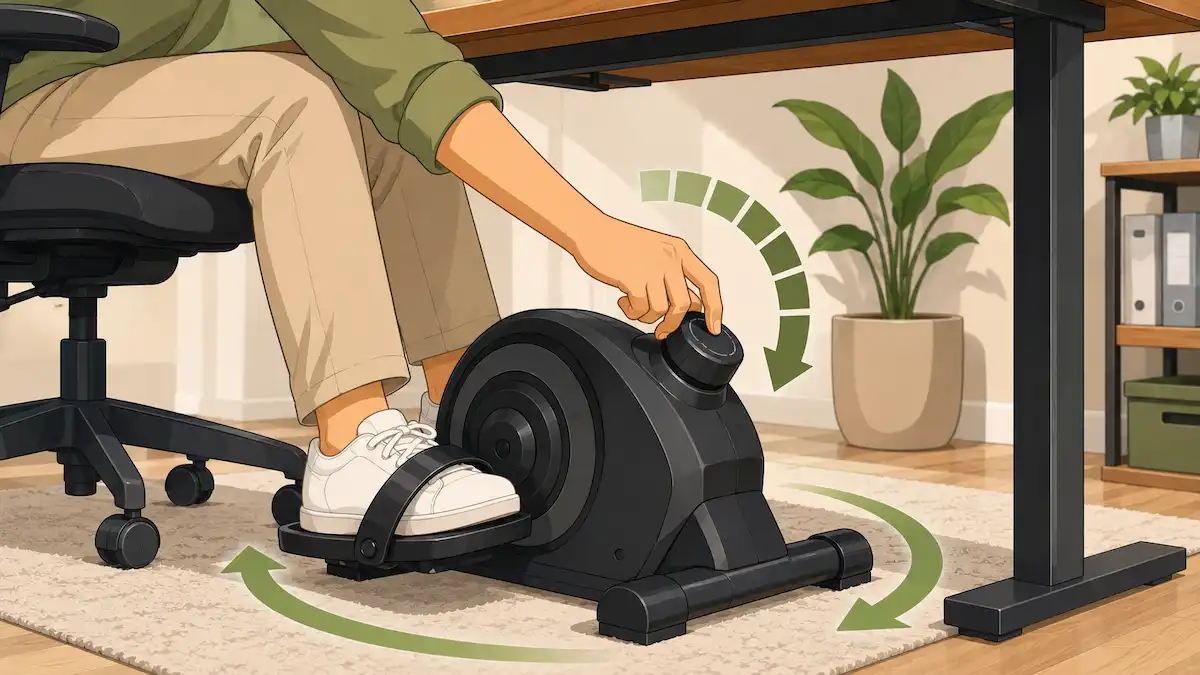
To find a working resistance for an under-desk pedal exerciser, start at the lowest setting and type a few lines at your usual pace. Increase the dial one step only if your feet spin ahead of the pedals. When a setting feels steady, write down the machine, dial position and task. A setting of 3 on another device can feel quite different.
Begin at the minimum setting and increase resistance gradually. Stop when the pedals no longer feel loose or uncontrolled but your torso remains still, your breathing and speech feel unchanged, and your normal work rhythm continues without extra effort.
The number printed beside the resistance control does not provide a universal measurement. One machine may offer eight magnetic settings, another may use a stepless tension knob, and a motorized elliptical may separate automatic speed from manual resistance. Level 4 therefore does not represent the same load across products.
In a randomized desk-pedaling experiment, work performance was equivalent at 17 and 25 watts and during nonpedaling, while participants reported greater ergonomic comfort at 17 watts. Most compact consumer machines do not display verified power in watts, so real-world buyers need to judge resistance by task compatibility, smoothness, stability, and control rather than by the level count alone.
This guide covers both circular-pedal exercisers and seated under-desk ellipticals. For product recommendations and the broader buying process, see the under-desk bike buying guide.
How Much Resistance Do You Need While Working?
For routine desk work, the useful resistance range is usually near the low end of the machine. You want enough tension to maintain contact with the pedals and control your cadence, but not so much that each stroke becomes a deliberate strength effort.
The correct setting may change with the task. Typing and detailed mouse work generally need the lightest, least distracting resistance. Calls, meetings, reading, and training videos may allow a slightly heavier setting because your hands and attention are less dependent on precise input.
Resistance is too low when your feet race ahead, the pedals feel nearly weightless, or you keep concentrating on slowing them down. It is too high when your hips or shoulders begin moving, your cadence repeatedly stalls, the chair shifts, or the pedaling competes with the work.
A useful machine therefore needs a smooth low end and enough additional range for reading, calls, or short movement breaks. It does not need an impressive maximum setting if the lower settings are poorly spaced or already too demanding for normal work.
Find a Practical Starting Resistance
Use the tool below to match resistance to the task you are performing, the type of adjustment control on the machine, and how the pedals currently feel. It provides a practical next step rather than attempting to convert one manufacturer’s level numbers into another manufacturer’s resistance.
Run the check while sitting in your normal working position. The same resistance can feel very different when chair distance, pedal speed, posture, or machine placement changes. Before fine-tuning the load, confirm that the bike fits without forcing an awkward chair position using our guide to how much desk clearance an under-desk bike needs.
Under-Desk Bike Resistance Finder and Buyer Checklist
Choose the task, adjustment style, and current pedal feel. The tool suggests an adjustment based on your task and pedal feel. Numbered levels differ between machines.
Choose your options, then select Show My Recommendation.
| Buyer Check | What Good Resistance Feels Like | Warning Sign | Why It Matters |
|---|---|---|---|
| Low-end control | The lowest setting permits slow, smooth pedaling without a dead spot or sudden surge. | The minimum setting already feels demanding, jerky, or difficult to sustain while typing. | Most work sessions happen near the low end, so unusable low settings shrink the practical range. |
| Spacing between settings | Each click or turn creates a small, noticeable change that is easy to evaluate. | One setting feels too light and the next immediately feels too heavy. | More labels do not help when the usable changes are poorly spaced. |
| Slow-cadence smoothness | Resistance remains even at the relaxed cadence you would use during normal work. | The machine feels smooth only when you pedal faster than you can comfortably maintain while working. | Desk use depends on controlled motion, not gym-style cadence. |
| Repeatability | A numbered setting or visible knob position makes a preferred work setup easy to find again. | The control is vague enough that each session begins with repeated trial and error. | A repeatable setting avoids readjusting the resistance from scratch each session. |
| Noise under load | The machine remains quiet through the low-to-moderate settings you expect to use. | Rubbing, clicking, or belt noise becomes obvious as resistance rises. | The resistance-level count does not tell you whether useful settings will be quiet enough for calls or concentration. |
| Stability under load | The frame and chair remain planted as resistance increases gradually. | The machine creeps, the chair rolls, or the user pushes forward with each stroke. | Resistance is only useful when the workstation remains stable enough to work. |
| Upper range | There is additional resistance available for reading, calls, or short movement breaks. | The product promotes many hard settings but offers little usable control at the bottom. | Maximum challenge is secondary unless the machine will also be used away from active work. |
| Display claims | The manufacturer explains whether the device measures power or only estimates speed, distance, and calories. | A display implies precision without measuring actual work rate or accounting for the user. | A numbered level and calorie readout should not be mistaken for standardized wattage. |
The work-task guidance uses practical fit cues rather than converting numbered levels across products. The research reference is the 17- and 25-watt desk-pedaling experiment. Product examples show why labels differ: 8-level magnetic resistance, stepless mesh-belt resistance, and separate motorized speed and manual resistance ranges.
Use the result as a starting approach, not a permanent setting. Recheck resistance whenever you change tasks, chair position, footwear, pedal speed, or machine placement.
When comparing products, use the same task and approximately the same cadence. A resistance setting that feels appropriate during reading may be too distracting during detailed typing or mouse work.
Why Resistance-Level Counts Are Not Comparable
A resistance number is usually an internal position on that product’s control system. It does not tell you how many watts the user is producing, how much force is required at the pedals, or how the same number would feel on a different machine.
Current under-desk products illustrate the problem. One compact bike may advertise eight magnetic settings, another may use a continuously adjustable mesh-belt knob, and a motorized elliptical may label automatic speed and manual resistance with separate ranges. Those numbers describe different mechanisms and cannot be read as one shared scale.
More levels are useful only when they divide the range into practical, well-spaced adjustments. A machine with eight smooth, usable settings can be easier to work with than one with 16 settings that are crowded together at the bottom or jump too sharply near the middle.
Do not assume that a digital display makes the resistance standardized. Unless a device actually measures power, its speed, distance, calorie, and resistance readouts remain product-specific estimates rather than laboratory-style watt measurements.
Low-End Control Matters More Than Maximum Resistance
The lower portion of the resistance range determines whether the machine can blend into a workday. The minimum setting should allow relaxed pedaling without a pronounced dead spot, sudden acceleration, or enough load to make each stroke feel deliberate.
A poor low end can fail in two directions. Some machines feel nearly weightless at the first setting, encouraging a fast and difficult-to-control cadence. Others begin with enough resistance that the user immediately braces through the chair or slows down during normal typing.
The upper range matters when you intend to use the machine for reading, calls, short movement breaks, or exercise away from active work. That extra range is useful only after the machine has already proven that its lowest settings are smooth, quiet, and compatible with the workstation.
Before buying, prioritize descriptions and reviews that discuss the lowest settings, the size of the change between settings, and performance at a slow cadence. Our guide to whether flywheel weight matters in an under-desk bike explains why pedal smoothness depends on the complete drivetrain and resistance system rather than one headline specification. High maximum resistance adds little if the settings you will actually use feel unpleasant.
Resistance and Pedaling Speed Work Together
Resistance cannot be judged separately from cadence. A user who pedals faster at the same dial position generally performs more work than a user who pedals slowly, which is why a machine may feel easy for several seconds and then become distracting as cadence rises.
Cubii explains that its calorie estimate increases as both resistance and revolutions per minute increase. DeskCycle similarly states that its calculations account for resistance-dial position and pedal speed, while also warning that many exercise-bike displays do not directly measure power.
Very low resistance paired with fast pedaling can also reduce stability. Cubii advises users experiencing sliding to try more resistance with a slower pace rather than pedaling extremely hard at a low setting. Chair position and floor contact still need to be checked before resistance is used as the only fix. Our guide to why under-desk bikes slide or wobble explains the additional frame, stabilizer, foot, and flooring factors involved.
For work, aim for a cadence that feels controlled enough to become background movement. The pedals should not run away from your feet, but the resistance should not be heavy enough to make the cadence repeatedly stall.
Match Resistance to the Work Task
The best resistance setting changes with how much precision, concentration, and upper-body stillness the task requires. Use these categories as starting points rather than fixed prescriptions.
- Detailed mouse work: Use the lowest smooth setting or pause pedaling when tracking, steering, editing, or fine pointer control begins to change.
- Typing and email: Keep resistance low enough that your shoulders, wrists, and typing rhythm remain unaffected.
- Calls and meetings: Low-to-moderate resistance may work because the hands are less involved, but speech and breathing should remain normal.
- Reading and training videos: A slightly heavier setting may feel comfortable when the task does not require continuous typing or precise mouse control.
- Short movement breaks: Moderate resistance can create a more deliberate session, but reduce it again before returning to active work.
You do not need to use the same setting for every task. The more useful routine is to keep one easy setting for work and a second, somewhat heavier setting for tasks or breaks that tolerate additional effort.
How Resistance Systems Change the Buying Decision
Numbered Magnetic Resistance
Numbered magnetic resistance gives the user repeatable reference points. Once a comfortable setting is found, returning to the same number is simple. The important question is whether the lower settings are smooth and whether the changes between them are small enough for desk use.
Stepless Resistance Knobs
A stepless knob allows adjustments between fixed clicks and can provide fine control. The tradeoff is repeatability: without markings or a clear pointer, finding the exact same work setting may require trial and error. A small removable mark can make the preferred position easier to identify.
Motorized Speed and Manual Resistance
Motorized ellipticals may move the pedals automatically at selectable speed levels, then provide a separate manual mode with resistance levels. Speed and resistance should not be treated as interchangeable. One controls how quickly the machine moves the legs; the other changes how much manual effort the user supplies.
No adjustment style is automatically best. Choose based on smooth low-end control, predictable changes, quiet operation, and how easily the preferred work setting can be restored each day. If calls and meetings are a primary use case, see what makes an under-desk bike quiet enough for calls before relying on broad claims about silent or office-friendly operation.
Signs the Resistance Is Too Low or Too High
Signs Resistance Is Too Low
- Your feet accelerate faster than the cadence you intended to maintain.
- The pedals feel almost weightless or difficult to control smoothly.
- You spend attention trying to slow the pedal motion.
- The chair or machine moves because you are pedaling vigorously with very little load.
- Your feet lift, bounce, or lose consistent contact with the pedals.
Increase resistance by one numbered step or a small turn of the knob, then slow your cadence. Also check pedal straps, chair distance, and machine placement before assuming resistance is the only cause.
Signs Resistance Is Too High
- Your hips rock or your shoulders tense during each stroke.
- Your back repeatedly leaves the chair or you push against the backrest for leverage.
- Your normal typing, mouse control, speech, or concentration changes.
- The cadence repeatedly stalls or feels difficult to restart.
- The resistance feels like a separate workout rather than background movement.
Reduce resistance until the upper body becomes quiet again. If the minimum setting still causes these problems, the machine may not offer a sufficiently light work range for your intended use.
How to Evaluate Resistance Before Buying
Resistance specifications become more useful when they are translated into the way the machine will actually be used. Run through these checks before treating a large resistance-level count as an advantage.
- Identify the main work tasks. Decide whether the machine will be used mostly for typing, calls, reading, or separate movement breaks.
- Look beyond the level count. Confirm whether the control is stepped, stepless, magnetic, belt-based, friction-based, or motorized.
- Prioritize the lowest settings. Look for evidence that the machine pedals smoothly and quietly at a relaxed cadence.
- Check adjustment spacing. Small adjustments should let you find a comfortable setting between too little and too much resistance.
- Check repeatability. Numbered settings or visible knob positions make the preferred work range easier to restore.
- Evaluate stability under load. Higher resistance should not cause the machine to creep or the chair to roll backward.
- Treat calorie and distance numbers cautiously. Determine whether the device measures actual power or produces estimates from cadence and internal calibration.
- Use a practical return option. Resistance quality is difficult to judge from a specification sheet when no detailed low-speed testing is available.
A machine with eight usable settings may be entirely sufficient for work. A machine with 16 settings may offer finer adjustment, but only if the lower portion of that range is smooth, quiet, and meaningfully separated.
Look for a low setting you can find again easily and use while continuing to work normally.
The Bottom Line on Under-Desk Bike Resistance
For active desk work, start at the lowest resistance setting and increase it only until the pedals feel smooth and controlled. The correct setting should allow your torso to remain still, your cadence to stay steady, and your normal work to continue without noticeable interference.
Resistance-level counts are not standardized across under-desk bikes. Eight numbered magnetic settings, a stepless tension knob, and ten motorized speed or resistance levels describe different systems and cannot be compared by their labels alone.
Prioritize a usable low end, gradual adjustment, slow-cadence smoothness, quiet operation, and stability under load. Extra upper resistance is helpful for reading, calls, or short movement breaks, but it should not come at the expense of the settings needed for ordinary work.
If you are still deciding whether light desk pedaling would get enough use to justify the purchase, see whether under-desk bikes are worth it for sedentary work.
Once the resistance range makes sense for your routine, the under-desk bike buying guide can help you compare complete models by pedal motion, clearance, stability, noise, portability, and overall design.
Disclaimer: The content on The Hearthful Home is for general informational purposes only and reflects independent research, experience, and opinions at the time of publication. It is not intended as medical, professional, or safety advice. Always follow manufacturer instructions and consult a qualified professional before starting any new product, routine, or practice. Product details, specifications, and prices are subject to change by their respective manufacturers or retailers. The Hearthful Home participates in the Amazon Associates Program and other affiliate programs, and may earn a small commission from qualifying purchases—at no extra cost to you.
Important: This article provides general information, not individualized medical, safety, installation, legal, or other professional advice. Product specifications, instructions, and safety information can change; verify current information with the manufacturer and consult an appropriately qualified professional when needed. See our Terms and Conditions for additional information.