
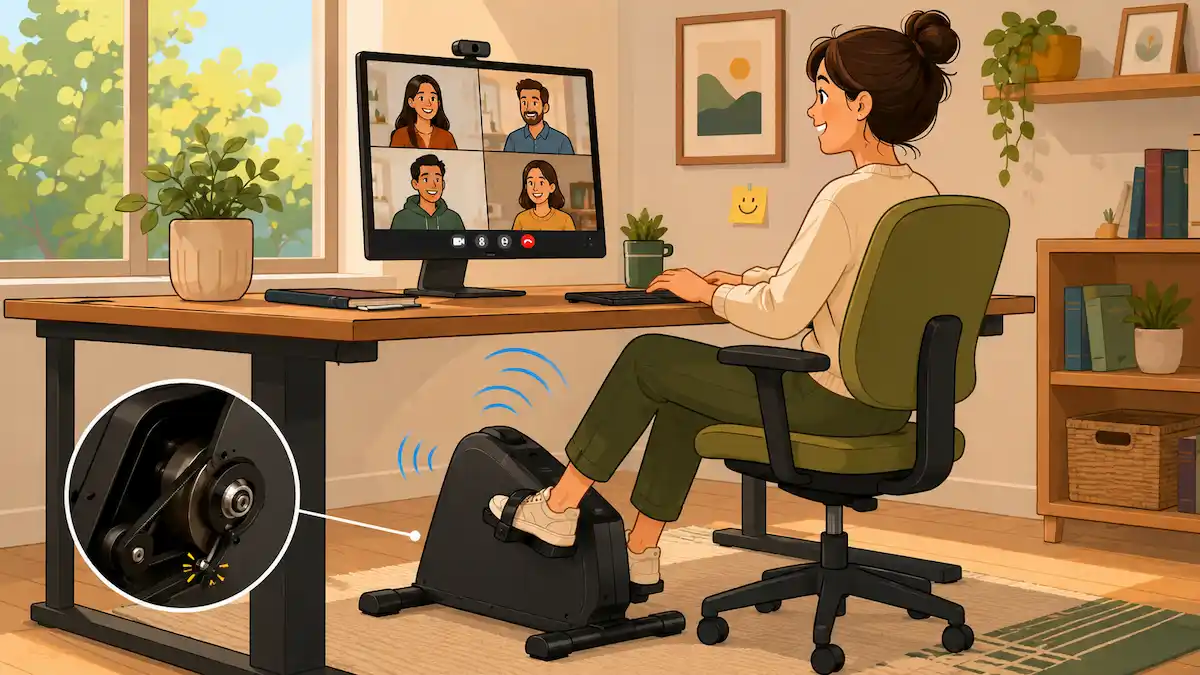
An under-desk bike can sound quiet beside your chair and still send a repeating click through your meeting microphone. What matters on a call is what the other person hears between words. Two short recordings in your usual meeting app, one with the pedals still and one with them moving, make that difference audible.
There is no single decibel number that guarantees call compatibility. The result changes with microphone placement, call software, noise suppression, room acoustics, flooring, chair position, pedal speed, resistance, and the character of the sound. A steady low-level swish can behave very differently from a quieter but recurring click, squeak, or tap.
The main machine-level clues are contactless resistance, a controlled belt or gear drive, low-friction bearings, tight pedal and crank hardware, rigid housing, well-supported rollers or linkages, and floor contact that does not transmit vibration into the desk or chair. Quietness can be lost when only one of those areas is poorly designed or assembled.
Current manufacturer descriptions illustrate the range of approaches. DeskCycle attributes quiet operation to touch-free magnetic resistance, while its specifications also identify twin belts and eight sealed bearings. Sunny combines magnetic resistance with a belt drive on its compact mini bike. Cubii describes its normal operating sound as minimal and comparable to white noise or a small desk fan. These are useful design clues, but the claims are not substitutes for testing the machine through your own microphone.
In this guide, under-desk bike includes circular-pedal exercisers and seated under-desk ellipticals. Their internal parts differ, but both can generate sound through the resistance system, drivetrain, bearings, pedals, linkages, housing, floor contact, and the way the machine is used. For model recommendations and the wider buying process, see the under-desk bike buying guide.
What Quiet Enough for Calls Actually Means
Room quietness and call quietness are not identical. You hear the machine from the chair through both the air and the floor, while meeting participants hear the version captured and processed by your microphone. A machine that seems noticeable in the room may barely appear in the call, while a small click directly beneath a laptop microphone may be surprisingly obvious.
Evaluate quietness at three levels. First, the sound should not distract you from speaking or listening. Second, the microphone feed should preserve clear speech without a recurring mechanical sound. Third, the machine should not transmit enough vibration through the floor, desk, or chair to disturb a nearby workspace or another room.
The character of the sound matters. A soft, steady swish or low hum is usually less intrusive than a click, tick, squeak, scrape, or panel buzz that repeats with each pedal stroke. The recurring sound creates a recognizable pattern during pauses in speech even when its overall level is modest.
Quietness also has to survive normal use. A product that sounds acceptable while spinning freely may change when resistance rises, the cadence slows, the pedals reverse, or the user begins pressing through the frame. Test the setting and speed you will actually use while working.
The practical pass condition is simple: record the exact call setup and listen from another device or through headphones. If your speech remains clear and the machine does not create a distracting repeating sound, it is likely quiet enough for that setup. A marketing label cannot answer that question as reliably as the microphone feed itself.
Check Whether a Bike Is Likely to Work During Calls
Use the tool below to screen a product or setup by microphone type, expected sound character, floor contact, and the disclosed drive system. It does not issue a universal decibel pass or fail because call performance depends on the complete audio path.
Select the options that most closely match how you will actually work. The result identifies whether the setup has stronger starting clues, needs careful recording, or presents a higher risk of audible call interference.
Under-Desk Bike Call-Noise Finder and Buyer Checklist
Choose the audio setup, sound character, floor contact, and drive information that best match the machine. The result estimates call risk and identifies what still needs a real recording test.
Choose the options that best match the setup, then select Evaluate Call Compatibility.
| Noise Source | Stronger Design Clue | Warning Sign | Why Calls Notice It |
|---|---|---|---|
| Resistance mechanism | Contactless magnetic resistance applies load without a pad or strap rubbing on the flywheel. | The listing uses friction, strap, or pad resistance but gives no low-speed sound information. | Direct contact can add a continuous scrape, changing rub, or wear-related noise beneath the voice. |
| Drive transmission | A disclosed belt drive with aligned pulleys and controlled tension. | Reviews mention chain chatter, belt slip, rubbing, surging, or a periodic catch. | Drive noise often repeats at pedal or flywheel speed, making it easier to notice during pauses in speech. |
| Bearings and shafts | Sealed bearings, supported shafts, and minimal side play are disclosed or well supported by reviews. | Grinding, gritty rotation, looseness, or a sound that changes at one point in every revolution. | Bearing and alignment problems can create narrow, mechanical sounds that stand out more than a soft airflow-like hum. |
| Rollers, rails, and pivots | Elliptical wheels and pads are protected, aligned, and easy to clean or service. | Squeaks, wheel chatter, dry pivot sounds, or dust-sensitive rolling surfaces. | Each linkage cycle can produce a recurring sound close to the microphone beneath the desk. |
| Pedals and fasteners | Rigid cranks, secure pedal hardware, controlled straps, and no lateral movement. | Loose pedal screws, tapping straps, pedal rocking, or crank clicks under load. | Short clicks and taps are transient sounds that can remain noticeable even when the overall machine is quiet. |
| Housing and frame | A rigid housing and base with tight panel fit and no loose covers, displays, or cables. | Thin panels buzz, the casing flexes, or a display and cable tap in rhythm with pedaling. | The housing can amplify internal vibration or add a second noise source through resonance and contact. |
| Floor interface | Rubber feet or a stable damping mat isolate the machine without allowing it to rock. | Bare hard-floor contact, uneven feet, rocking, creeping, or vibration felt in the desk and chair. | Structure-borne vibration can travel through the floor and furniture even when airborne machine noise seems modest. |
| Cadence and resistance | The machine remains quiet at the slow cadence and low-to-moderate resistance used during actual work. | It sounds quiet only when unloaded, spinning quickly, or used at a different setting from the one you need. | Speed changes how often sound repeats, while load can reveal flex, slip, or contact that is absent during a showroom spin. |
| Motor and electronics | Powered models start, stop, and change speed gradually without a prominent motor whine or control beep. | Gear whine, abrupt direction changes, loud beeps, relay clicks, or an always-on fan. | Motorized machines add powered sound sources that manual magnetic designs do not have. |
| Serviceability | The maker provides maintenance guidance, replacement parts, warranty support, and a useful return period. | The listing promises silence but provides no troubleshooting path or support for a new squeak or click. | A quiet new unit can become distracting if dust, looseness, wear, or alignment cannot be corrected. |
| Microphone path | A headset or close external microphone is tested with the exact call app and noise-suppression setting. | The only test uses room listening while the actual calls rely on a laptop mic or speakerphone near the machine. | Call participants hear the microphone feed, not the room exactly as you hear it from the chair. |
This is a call-compatibility screen, not a standardized decibel rating. The mechanical clues are grounded in official descriptions of touch-free magnetic resistance, twin belts and sealed bearings, Sunny’s belt-driven magnetic mini bike, and Cubii’s wheel, pad, fastener, and lubrication guidance.
Treat the result as a screening tool rather than proof that other people will not hear the machine. The final answer comes from the exact microphone feed after the bike, chair, desk, floor, resistance, and cadence are placed as they will be during a normal workday.
A favorable result should still be tested before the return period closes. A recurring click or floor vibration can matter more than a soft overall sound, and those details may not appear in a product description or a fast demonstration video.
Why Whisper-Quiet and Decibel Claims Are Hard to Compare
Words such as quiet, silent, and whisper-quiet are useful only when the product also explains how the claim was evaluated. The measured result can change with microphone distance, room size, wall and floor surfaces, background noise, resistance level, cadence, product age, and whether the unit is loaded by a real user.
A decibel value without a test method is incomplete. A reading taken several feet away in a furnished room cannot be compared directly with one taken close to the housing on a hard floor. The number also does not describe whether the sound is a smooth hum, intermittent click, squeak, rattle, or motor tone.
Call compatibility adds another layer. Meeting participants hear a microphone and software-processed signal rather than the raw sound pressure beside the machine. A headset microphone, laptop microphone, and phone speakerphone can produce different results in the same room.
The NIOSH Sound Level Meter app can provide a more consistent relative comparison on supported iOS devices. NIOSH reports that the app was tested within approximately ±2 dBA under its validation conditions. It was created for workplace-noise awareness, however, not as a universal standard for deciding whether exercise equipment is audible in a video call.
If you measure sound, compare the room baseline and pedaling result from the same device position, room, flooring, cadence, and resistance. Then complete a call recording. The difference between the two readings may help you compare setups, but the recording remains the more direct test of what another participant will hear.
Magnetic Resistance and Belt Drive Are Strong Starting Clues
Contactless magnetic resistance removes the rubbing brake surface used by friction pads, straps, or similar systems. The magnets apply resistance without touching the flywheel, eliminating one direct source of scraping noise and wear.
DeskCycle specifically describes its touch-free magnetic mechanism as designed not to disturb coworkers. Sunny likewise pairs magnetic resistance with a belt-drive mechanism on its current compact mini bike and describes that combination as quiet and smooth for home use.
A belt drive is generally a stronger call-friendly clue than a chain drive because it does not require metal chain engagement through a series of sprocket teeth. The belt still needs correct tension, pulley alignment, suitable material, and enough housing rigidity to avoid slipping, rubbing, or transmitting vibration.
Neither feature is a guarantee. A magnetic bike can still produce bearing noise, pulley rub, loose-pedal clicks, casing buzz, display rattle, or floor vibration. A poorly tensioned belt can also create a periodic sound that repeats through the call. Our guide to what makes an under-desk bike pedal smoothly explains how the flywheel, drive, bearings, resistance mechanism, and frame work together.
Friction resistance is not automatically unacceptable. A well-designed contact system can remain controlled and quiet enough for some workspaces. It simply introduces an additional wear and contact surface that deserves closer testing during long sessions and at different resistance settings.
Motorized under-desk ellipticals require a separate evaluation. Even when they incorporate magnetic resistance, they may also contain a motor, gears, controller, beeper, relay, or cooling system. Test powered starts, stops, direction changes, and every speed you expect to use during calls.
Bearings, Rollers, Linkages, and Pedals Create the Small Sounds
The resistance system can be nearly silent while smaller rotating and moving parts create the sound that reaches a microphone. Bearings, pedal threads, crank interfaces, rollers, rails, pivot points, straps, and fasteners deserve as much attention as the flywheel.
Sealed bearings are a useful design clue because they support rotating shafts while helping retain lubricant and exclude debris. DeskCycle lists eight sealed bearings in its twin-belt drivetrain and connects those components with long-term quiet operation.
Seated ellipticals add rollers, wheel pads, rails, and linked pedal arms. Cubii’s official noise guidance says dust and small particles can enter the wheels and wheel-pad surfaces and contribute to squeaking. It also directs owners to check pedal screws and specified lubrication points when noise develops.
Those maintenance instructions reveal useful pre-purchase questions. Are the rolling surfaces protected and accessible? Can pedal hardware be retightened? Are replacement wheels, pads, bearings, or linkages available? Does the company provide a real diagnostic process when a recurring noise appears?
A click that occurs once per pedal revolution often points toward a pedal, crank, strap, or rotating fastener. A faster repeated sound may be linked to a pulley, flywheel, roller, or motor. A squeak that changes as the frame moves may come from a pivot, floor foot, casing joint, or furniture contact.
Do not assume that every sound is normal break-in behavior. Grinding, scraping, pronounced clicking, or changing side-to-side play should be resolved through assembly checks, manufacturer support, or return rather than accepted as the expected sound of an office machine.
Materials and Frame Construction Control Vibration and Resonance
A material label by itself does not tell you whether a machine will be quiet. A steel frame can remain rigid but transmit vibration efficiently, while a plastic housing can damp some sound yet buzz if its panels are thin, loose, or poorly supported.
The stronger design combines rigidity with damping. Shafts and pulleys need a structure that stays aligned, while covers, displays, cables, and decorative panels need tight interfaces that do not tap or resonate with the pedal cycle.
Pay attention to every contact point. Pedal straps can slap the housing, a display cable can tap the frame, a carrying handle can rattle, and a loose battery cover can create a sharper sound than the drivetrain itself. Reviews that mention a rattle are more informative when they explain where it occurs.
The base also changes what the room hears. Rubber feet and a stable damping mat can reduce vibration transfer into hard flooring. The machine must remain level, because a soft mat that allows rocking can create new movement and noise rather than solving it. Our guide to why under-desk bikes slide or wobble explains how base width, stabilizers, feet, floor contact, and frame rigidity affect movement.
Check the surrounding furniture as well. Chair casters, desk legs, cable trays, footrests, and objects resting on the desktop can vibrate in response to pedaling. A quiet bike may appear noisy when another part of the workstation is actually producing the click or buzz.
For shared buildings, evaluate structure-borne sound separately from room sound. Place a hand on the desk and floor while pedaling, and ask someone in the adjacent room or below the workspace whether they feel or hear a repeating vibration.
Cadence and Resistance Change What the Machine Sounds Like
An under-desk bike does not have one fixed operating sound. Pedal speed changes how frequently the drivetrain, rollers, bearings, and linkages cycle. Resistance changes how much force passes through the cranks, belt, housing, and frame.
Very light resistance may encourage faster pedaling, making a soft repeating sound more continuous. Higher resistance can slow the cadence but place enough load on the structure to reveal flex, belt slip, pedal clicks, or floor movement.
Test the machine at the low-to-moderate setting you expect to use while speaking. A product demonstration at a fast cadence may mask a dead spot or periodic sound, while a showroom spin without body weight may not reveal noise created under normal load.
If the machine supports reverse pedaling, test both directions. A properly aligned system should not introduce a new rub, click, or linkage sound simply because the direction changes.
Also repeat the test after a normal-length session. A machine that is quiet for the first minute may sound different after belts, pads, rollers, pivots, or motor components have been operating continuously.
The quietest usable setting is the one that keeps the cadence controlled and the frame stable without producing a sound that competes with speech. That may not be the absolute lowest resistance level. See how much resistance an under-desk bike needs for a task-based way to find a smooth, controlled work setting.
Your Microphone and Call Software Matter as Much as the Bike
A headset or boom microphone usually provides the strongest starting arrangement because the microphone sits close to your mouth and farther from the machine. A close external microphone can work similarly when its position and pickup pattern remain consistent.
A laptop microphone is more exposed to the under-desk sound field and may also receive vibration through the desktop. A phone or speakerphone placed on the desk captures a wider portion of the room and can be especially sensitive to sound transmitted through furniture.
Call software can help. Microsoft Teams provides background-noise suppression, and Microsoft says its audio processing can suppress background noise, cancel echo, and reduce reverberation. Apple’s Voice Isolation mode gives priority to the user’s voice while minimizing surrounding noise in supported call apps.
Noise suppression should be treated as the final layer, not as permission to buy a mechanically noisy unit. A repeating click, squeak, or changing motor tone may still pass through, and aggressive processing can alter speech when the background sound is strong or irregular.
Test the exact app and settings you use at work. A recording made in a general voice-memo application may not represent Teams, FaceTime, or another meeting platform after its microphone processing is applied.
If your call app offers an original sound, wide-spectrum, or music mode, remember that those settings may intentionally capture more of the room or reduce background filtering. Use the normal speech-call configuration for the compatibility test unless that broader audio mode is part of your actual workflow.
How to Test an Under-Desk Bike for Calls Before the Return Window Closes
Test the complete workstation instead of judging the machine in isolation. Use the same room, chair, desk, microphone, call application, footwear, resistance, and cadence that will be used during ordinary work. Before testing sound, confirm that the bike fits without forcing the chair or keyboard out of position using our guide to how much desk clearance an under-desk bike needs.
- Set up the final position. Place the bike beneath the desk, stabilize the chair, route cables, and add the mat or floor protection you intend to keep.
- Record a room baseline. Capture 20 to 30 seconds with the machine stopped so you know how the room, computer fan, air conditioning, and microphone sound before pedaling begins.
- Record the machine by itself. Pedal at the intended resistance and cadence without speaking. Listen for a steady swish, rhythmic pulse, click, squeak, scrape, rattle, or motor tone.
- Add normal speech. Read a paragraph at your usual meeting volume while maintaining the same cadence. Do not speak louder to compensate for the machine.
- Use the actual call path. Join from a second device, record a private meeting, or ask another person to listen through the platform you use for work.
- Check noise suppression. Test the normal setting and any stronger speech-isolation option available to you. Do not rely only on a general room recording.
- Test multiple operating conditions. Try the lowest work setting, the setting used during calls or reading, a slightly faster cadence, and reverse motion when supported.
- Isolate the sound source. Hold loose straps, displays, cables, or panels one at a time. Test a mat, check level feet, and notice whether the desk or chair vibrates.
- Repeat after a normal session. Record again after the machine has operated for the length of time you expect to use it continuously.
- Keep a comparison file. Save the recordings when comparing products or setups so that quiet is based on the same microphone and room rather than memory.
An optional sound-level reading can supplement the recordings. Keep the phone or meter in the same position and compare the room baseline with the pedaling result. Do not treat the reading as a universal call threshold or compare it with a manufacturer number collected under unknown conditions.
The machine passes when normal speech remains clear, the sound does not become distracting during pauses, and no recurring click, squeak, or vibration reaches the listener. If the setup requires unusually loud speech or aggressive software filtering, it is not a strong call fit.
The Bottom Line on Quiet Under-Desk Bikes for Calls
An under-desk bike is quiet enough for calls when its complete mechanical system and your complete audio setup work together. Contactless magnetic resistance and belt drive are strong starting clues, but bearings, rollers, pedals, fasteners, housing, frame rigidity, floor contact, cadence, and microphone placement can still determine the result.
Prioritize a soft and consistent sound over an impressive silent claim. Recurring clicks, taps, squeaks, scrapes, panel buzz, and motor whine are more likely to call attention to the machine than a low steady background sound.
Look for sealed bearings, secure pedal hardware, supported shafts or linkages, a rigid housing, stable rubber feet, accessible maintenance points, replacement-part support, and a useful return period. Materials matter through fit, rigidity, damping, and serviceability, not through a simple metal-versus-plastic label.
Finally, record the bike through the exact microphone and call software you use. That test is more meaningful than a marketing adjective or an isolated decibel number.
If call compatibility is only one part of your decision, see whether under-desk bikes are worth it for sedentary work. Once the noise behavior fits your workspace, the under-desk bike buying guide can help you compare complete products by clearance, resistance, smoothness, stability, portability, and overall construction.
Important: This article provides general information, not individualized medical, safety, installation, legal, or other professional advice. Product specifications, instructions, and safety information can change; verify current information with the manufacturer and consult an appropriately qualified professional when needed. See our Terms and Conditions for additional information.