
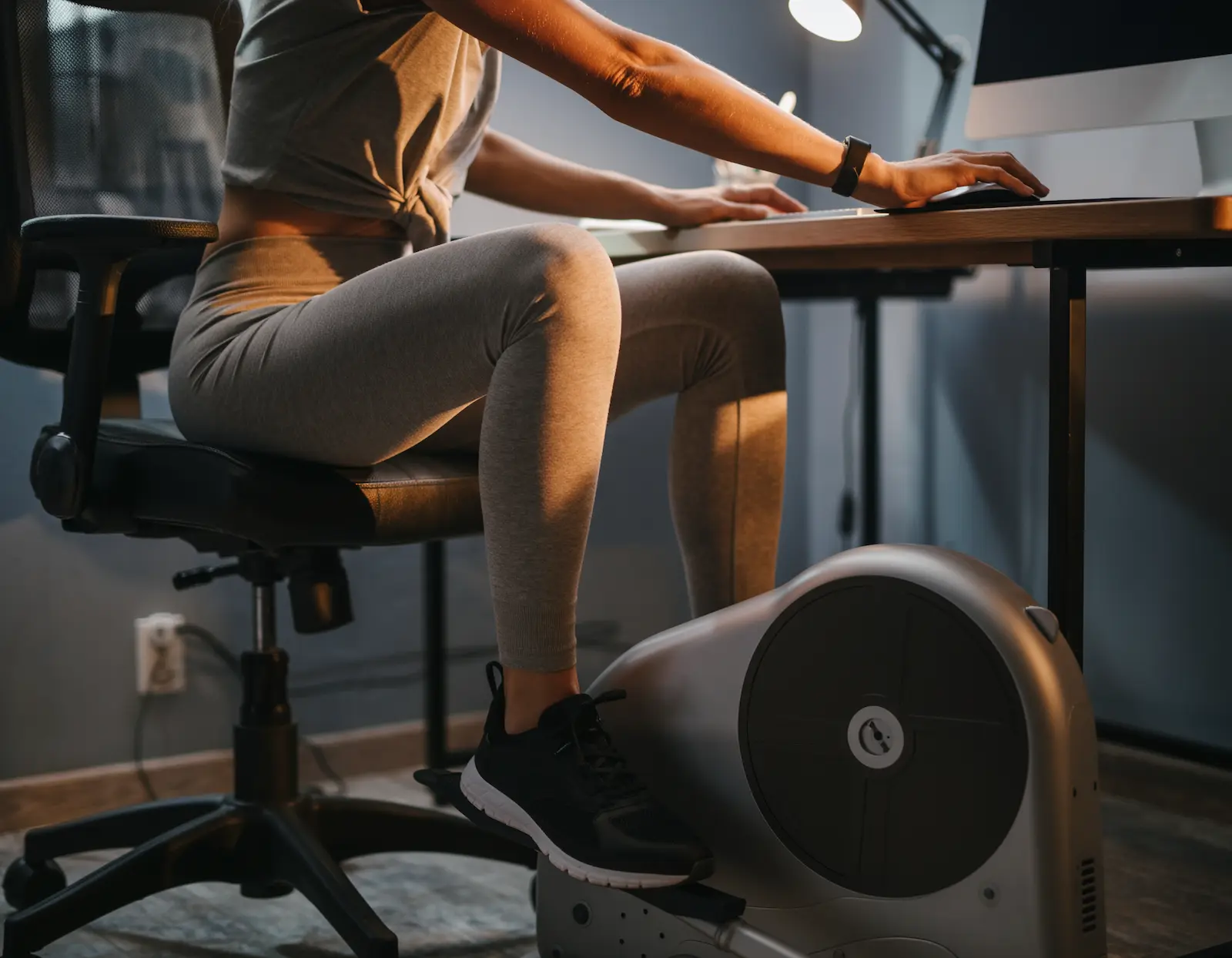
An under-desk bike has to share a small space with your chair, your feet and the underside of the desk. The important dimension is the path your knee takes as the pedal rises. A low-looking frame can still bring the top of your thigh into contact with a drawer or crossbar on each turn.
A circular pedal stroke feels different from the flatter stride of a seated elliptical. The chair matters, too. If it rolls away as you push on the pedals, the whole setup changes position. Some models include a tether or mat, while others are easier to leave planted at one workstation.
Movement around the room is part of the choice as well. Wheels and a pull handle can make it easier to put a heavier unit away after work. A compact mini bike can be carried by hand, and separate arm and leg pedals suit a different sort of seated session. Those differences help explain why two devices that fit under the same desk may suit different people.
Top Picks: Under-Desk Bikes for Different Setups
We evaluated these under-desk exercisers using The Hearthful Standard, considering their construction, movement, workstation fit, maintenance, and manufacturer documentation. We selected Cubii Go for its wheels and retractable handle, which make moving it between rooms easier, and DeskCycle 2 for its adjustable low pedal height and detachable display. LifePro FlexCycle Plus adds separate arm and leg pedals with stability accessories, while Sunny’s mini bike offers a compact format with optional Bluetooth tracking. Comfortable knee clearance still depends on the desk, chair, and person using the machine.
Note: Some links in this post are affiliate links. If you purchase through them, I may earn a commission at no additional cost to you. As an Amazon Associate I earn from qualifying purchases.

Elliptical stride and wheels for moving rooms
Cubii Go
The seated elliptical offers ten resistance settings and a retractable handle with wheels. It suits a routine that moves between rooms when the larger floor footprint fits.

Circular pedals with adjustable height
DeskCycle 2
The circular-pedal exerciser provides adjustable 9-to-10-inch pedal height and eight magnetic resistance settings. Its detachable display suits a machine that stays at one workstation.

Separate arm and leg pedals
LifePro FlexCycle Plus
Separate arm and leg pedals, eight settings and included stability accessories support different seated setups. The selected version includes Bluetooth tracking, with current size and weight best confirmed before ordering.

Compact exerciser with optional tracking
Sunny SF-B023005DGY Mini Bike
The compact arm-or-leg exerciser combines stepless resistance, a carry handle and a digital display. Optional SunnyFit tracking sits alongside basic manual operation.
What Actually Matters in an Under-Desk Bike
An under-desk bike has to work as part of a complete workstation. The most important checks are whether the motion fits your tasks, whether the pedal path clears the desk, whether the machine and chair stay controlled, and whether the equipment can remain accessible enough to use regularly.
Decide Whether Pedaling Fits the Workday
Calls, meetings, reading, training videos, email, and routine administrative work are usually easier to combine with light pedaling than detailed mouse control, precise design work, or demanding writing. The under-desk bike worth-it guide explains how task compatibility, available desk time, storage, and realistic use frequency affect the decision before a model is chosen.
Task compatibility should still be tested instead of assumed. In one controlled study, using a cycling workstation reduced mouse accuracy without reducing movement speed, reinforcing why light pedaling may fit some forms of work better than precision pointer tasks. See the published mouse-dexterity study.
The goal is not to pedal through every task. A machine can still earn its space when it works reliably during a few repeatable blocks of the day and can remain in position without becoming another setup project.
Measure the Complete Pedal Path
Desk clearance is determined by the knee at the highest point of the motion, not just the machine’s resting height. Shoes, chair height, leg proportions, desktop thickness, drawers, crossbars, cable trays, and the difference between circular and elliptical motion all change the fit. The under-desk bike clearance guide gives the full measurement sequence.
The DeskCycle 2 lists a 9- to 10-inch pedal height. Mark that height beside your desk, wear the shoes you use there and raise one foot into the working position. If your thigh contacts a drawer, adjusting resistance will not solve the fit. The Cubii’s elliptical path gives you another configuration to check before ordering.
A low published pedal height is useful, but it is not a universal fit guarantee. The chair still has to place the hips and feet correctly, and raising the seat to create knee room only works when the keyboard, mouse, and foot support remain usable.
Prioritize Slow-Cadence Control, Noise, and Stability
Resistance levels are not standardized across brands, so one machine’s Level 4 cannot be compared directly with another’s. Start with the lowest setting that keeps the pedals controlled rather than loose or free-spinning. The resistance guide explains how the low end, spacing between settings, and work task should shape the choice.
Smoothness comes from the whole drivetrain: flywheel speed, gearing, belts or linkages, bearings, shafts, resistance consistency, crank geometry, and frame rigidity. The pedal-smoothness guide explains why a headline flywheel number is only one part of the system.
Check noise and stability separately. A soft continuous swish may matter less on a call than a recurring click or floor vibration, while a planted machine can still feel unstable when the chair rolls backward. Use the call-noise guide and the sliding and wobble guide to evaluate those problems independently.
Plan for Storage and Ownership
Portability is more than product weight. A retractable handle or built-in wheels can matter when the machine moves between rooms, while a heavier frame may be preferable when it can remain permanently under one desk. The best design is the one that makes the machine easier to keep available in the place where it will actually be used.
Before ordering, compare maintenance instructions, pedal and strap replacement, belt or bearing access, display batteries, warranty coverage, return terms, seller authorization, and whether the exact model is easy to identify. A low price is less appealing if a worn part cannot be replaced or the seller’s support terms are unclear.
How We Evaluate Under-Desk Bikes
Our recommendations in this guide are research-based. Manufacturer documentation, official support materials, and independent sources form the evidence base for this comparison.
Measure the clearance beneath your desk and consider whether a circular or elliptical motion will fit the work you do there.
Manufacturer dimensions, resistance claims, warranty terms, and maintenance instructions remain attributed and linked to the relevant source trail. Independent material is used where it helps explain workstation fit or movement, and model, seller, or documentation conflicts remain visible rather than being silently resolved.
Materials
We examine the frame, stabilizers, housing, contact surfaces and drivetrain components that the manufacturer identifies. The useful question is how those parts support the intended motion and care routine.
Design & Function
We consider the motion path, pedal height, resistance, display, chair tethering and portability. A compact manual machine can serve its purpose well without an app or motor.
Use & Interaction
We examine desk clearance, chair and floor interaction, setup, storage and control access. The machine must fit the work task as well as the space beneath the desk.
Durability & Longevity
We examine the construction, replaceable parts, maintenance instructions and warranty-backed service route. Longer support is useful when its eligible sellers and repair conditions are clear.
Transparency & Trust
We check model identification, dimensions, component descriptions, operating instructions and warranty conditions. Conflicting regional or revision-specific details must remain visible rather than becoming a combined specification.
A Closer Look at Each Pick
Elliptical stride and wheels for moving rooms
Cubii Go
Choose the Cubii Go when seated elliptical motion and rolling portability matter more than the smallest footprint or the lowest circular pedal height. Its main tradeoffs are the larger floor area, extra transport components, and a shorter base warranty than the strongest long-term coverage in the group.
Price and availability last updated: 2026-11-25 at 19:10.
Materials
Cubii identifies steel, ABS plastic, ferrous steel, rubber, and glass-filled nylon across its elliptical products and specifically notes the added glass-filled nylon in the Go. That is a useful material map for the mixed structural, housing, wheel-track, and contact components, although Cubii does not publish a detailed part-by-part repair diagram. See the company’s materials disclosure.
Design & Function
The current F3A4 Cubii Go manual lists dimensions of 23.6 × 17.3 × 9.5 inches, a net weight of 21.8 pounds, ten resistance levels, and a 300-pound maximum user rating for seated use. The LCD tracks strides, estimated calories, distance, time, and RPM, while the retractable handle extends so the built-in wheels can engage for transport.
Use & Interaction
The elliptical path avoids the full circular crank of a mini bike and can be pedaled forward or backward, but the desk fit still depends on the highest knee position, chair height, shoes, and obstructions beneath the work surface. Cubii recommends maintaining roughly two to three inches between the knees and desk. The clearance guide is still the safer way to evaluate the full setup.
The rolling handle is the clearest interaction advantage when the machine moves between an office, living room, and storage area. Users who can leave a machine permanently under one desk may place more value on a smaller footprint or heavier stationary base.
Durability & Longevity
The F3A4 manual tells owners to wipe the wheel tracks with a damp cloth, check pedal and crank fasteners, and request Cubii-supplied parts for worn components. These are accessible maintenance steps for keeping the rolling and pedaling systems in service. Cubii’s published limited warranty provides one year of base coverage, with an additional year for eligible seated ellipticals registered within 90 days. Retain the receipt and check the seller’s authorization because the policy permits rejection of unauthorized-seller claims.
Transparency & Trust
Cubii provides a model-specific manual, dimensions, weight, resistance range, user limit, maintenance instructions, material information, desk-fit guidance, and a published warranty. The evidence is spread across the product page, manual, support center, and warranty page rather than consolidated in one specification sheet, but the major pre-purchase details are traceable.
- Seated elliptical path with 10 resistance levels.
- Retractable handle and built-in wheels.
- Model-specific manual and maintenance instructions.
- LCD tracks strides, time, distance, RPM, and estimated calories.
- One-year base warranty is shorter than the strongest coverage here.
- Still requires a complete knee-clearance measurement.
- Mixed transport and pedal components add more moving parts.
- Larger floor footprint than the smallest circular-pedal machines.
Circular pedals with adjustable height
DeskCycle 2
Choose the DeskCycle 2 when low circular-pedal height, controlled magnetic resistance, a planted base, and adjustable desk clearance matter more than rolling portability or app features. Its main constraint is still the circular knee path, which has to be measured against the actual desk.
Price and availability last updated: 2026-11-25 at 19:10.
Materials
VIVO identifies steel construction, adjustable pedal straps and a wide stabilizer for the selected US DeskCycle 2. Its current US manual confirms sealed bearings and gives clear assembly and pedal-strap instructions. The straps are removable, and the stable leg assembly can be adjusted without opening the enclosed drivetrain.
Design & Function
The US DeskCycle 2 specification lists eight magnetic resistance settings, a 9-to-10-inch pedal-height range and a flywheel turning 14 times per pedal stroke. The detachable display tracks speed, RPM, time, estimated distance and calories. Adjustable pedal height is its clearest distinction for a fixed desk; the flywheel rotation figure describes the mechanism and is not a cross-brand smoothness measurement.
Use & Interaction
The adjustable pedal height is the main reason to choose this model. A lower crank position can improve the odds beneath a fixed desk, but leg length, chair height, desk thickness, and the complete knee path still decide the fit. The broad stabilizer and low center of gravity suit a fixed workstation. To move the DeskCycle 2, lift the complete machine. The Cubii Go has a rolling handle for that job.
Resistance is controlled directly on the housing, so ordinary operation does not depend on an app. The circular pedal path remains more likely to create noticeable knee rise than a short elliptical stride, which makes the clearance measurement essential.
Durability & Longevity
The US manual says not to lubricate the sealed bearings and directs owners to inspect and tighten the pedals, keep the machine indoors and contact DeskCycle support for defective or missing parts. It also provides a 30-day return route, with buyer-paid return shipping for an unwanted order. VIVO’s warranty policy limits coverage to qualifying sellers and says the period varies by product, so confirm the term on the selected US offer rather than transferring the one-year term from an Australian listing.
Transparency & Trust
DeskCycle provides a current US manual, numbered controls, pedal-height settings, display instructions and direct support contacts. The US page and regional pages use different weight and flywheel descriptions, and the general US warranty policy does not state a single duration for every product. Use the exact US model and seller record for those details instead of combining regional specifications.
- Adjustable 9–10-inch pedal height.
- Current US manual with sealed-bearing care and pedal adjustment.
- Wide 20-inch front stabilizer and low center of gravity.
- Detachable display and eight magnetic resistance settings.
- Heavier and less convenient to move between rooms.
- Circular pedal path can still create significant knee rise.
- No built-in rolling transport system.
- Some published drivetrain and weight figures differ across regional listings.
Separate arm and leg pedals
LifePro FlexCycle Plus
Choose the FlexCycle Plus when the arm-pedal configuration, tether, mat, bands, Bluetooth, and lifetime-warranty program will all add real value. It is less compelling when the priority is the simplest permanent desk setup, the clearest internal specifications, or a machine that can be rolled away without handling accessories.
Price and availability last updated: 2026-11-25 at 19:10.
Materials
LifePro’s FlexCycle Plus manual shows stabilizers bolted to metal attachment points, threaded replaceable pedals, a strap tether and an enclosed mechanism. These components provide a practical structure for seated arm or leg cycling, with separate contact surfaces and support accessories. The exact frame alloy and housing polymer are not identified, so buyers seeking a particular material should not infer one from the photographs.
Design & Function
The LifePro FlexCycle Plus provides separate arm and leg pedals, eight numbered resistance settings and a digital monitor. The selected Bluetooth package includes front and rear stabilizers, a chair tether, resistance bands, a non-slip mat and assembly tools. Tracking is optional. LifePro’s current product Q&A leaves reverse operation unclear, so follow the supplied instructions and check with support before adding reverse pedaling.
Use & Interaction
The tether and mat are useful when a rolling chair or smooth floor would otherwise move during pedaling. The arm configuration requires a stable surface, enough room around the machine, and a deliberate pedal swap, so its value depends on whether the buyer will actually change modes rather than leaving the unit beneath one desk.
Bluetooth adds optional tracking, but the core resistance and display remain available without building the workout around an app. The accessories add versatility, but they also need storage space and extra setup.
Durability & Longevity
LifePro’s lifetime warranty covers defects in material or workmanship through repair, replacement or necessary components. The FlexCycle Plus manual describes a replacement-parts and guided-repair route, with replacement if the machine cannot be repaired, and asks for registration within 14 days. This is a useful long-term support arrangement, but eligibility matters: the current policy requires dated proof of an authorized purchase and names Lifepro Outlet as its Amazon seller. Follow the care instructions and use authorized support for internal service.
Transparency & Trust
LifePro identifies the included accessories, resistance settings and warranty route, but its dimensional information is inconsistent. The product-page Q&A and earlier manufacturer manual give an 18.1-pound net weight, while a newer manufacturer manual lists 28.9 pounds and different dimensions. Confirm the current supplied unit’s weight and footprint with support before ordering for a tight space or a lifting limit. The vague reverse-pedaling answer and incomplete internal material detail also make this a less straightforward specification comparison than the other choices.
- Separate pedals for leg and arm use.
- Includes tether, exercise mat, resistance bands, and stabilizers.
- Eight-step intensity adjustment and Bluetooth tracking.
- Lifetime warranty and 30-day returns.
- Structural material disclosure is limited.
- More accessories and setup steps than a dedicated desk bike.
- No built-in rolling transport system.
- Reverse-pedaling support is unclear.
Compact exerciser with optional tracking
Sunny SF-B023005DGY Mini Bike
Choose the Sunny Smart Mini Exercise Bike when price, compact storage, a carry handle, stepless resistance, arm-or-leg use, and optional app tracking matter most. Its main tradeoffs are the shorter parts warranty, unnumbered resistance control, and the need to stabilize both the machine and chair.
Price and availability last updated: 2026-11-25 at 19:10.
Materials
Sunny’s model-specific parts list identifies a bolted main frame and stabilizers, crank arm, bearing clamp, belt wheel, replaceable belt, separate covers and pedal straps. The layout shows how the load-bearing structure and enclosed moving parts fit together, while leaving the exact alloys and housing polymer unspecified. The removable covers and separately identified wear parts provide a practical basis for support and maintenance.
Design & Function
Sunny lists dimensions of 17.9 × 16.1 × 11.7 inches, stepless knob resistance, arm-or-leg training, a digital monitor for speed, time, distance, and estimated calories, Bluetooth connection to SunnyFit, and a built-in carry handle. Stepless resistance allows small adjustments but makes it harder to return to one precisely numbered setting.
Use & Interaction
The compact shape and carry handle are useful if you need to put the machine away after work. At a workstation, the machine still needs a stable floor interface and a chair that will not roll backward. The stability guide explains why machine slip, frame movement, chair roll, and foot movement should be diagnosed separately.
The app is optional rather than required for basic use. The product page compares the manual model with motorized Sunny mini bikes on the same page, so the selected SF-B023005DGY configuration should be confirmed before checkout.
Durability & Longevity
Sunny provides a model-specific manual and assembly page and an exact-model repair guide covering the belt, covers, sensor and pedals. Those resources make the service pathway clearer than a generic contact form. Under Warranty B, the structural frame has one year of coverage and other parts have 180 days, which is a specific limitation for ongoing ownership. Keep the model and part number when requesting a replacement.
Transparency & Trust
Sunny clearly identifies the SF-B023005DGY, its dimensions, stepless controls, Bluetooth functions and parts. The manual shows the different tightening directions for the left and right threaded pedals and directs owners to secure them properly before use. The repair guide and warranty are accessible, although the exact structural alloys and housing polymer remain unspecified.
- Lowest-cost role in the comparison.
- Compact design with a built-in carry handle.
- Stepless resistance permits small adjustments.
- Bluetooth, display, and model-specific service guidance.
- Chair and machine require separate stability checks.
- No numbered resistance settings for repeatability.
- Stepless resistance has no numbered settings to repeat.
- Parts-and-components warranty is relatively short.
Tips for Better Under-Desk Bike Setup
Even a well-designed machine can feel wrong when the workstation is built in the wrong order. Establish clearance, chair position, low-speed resistance, floor contact, and task compatibility before deciding whether the product fits.
Measure the Full Motion Before Raising the Chair
Place the machine where it will be used and check the knee at the highest point of the stroke. Include shoes, desktop thickness, drawers, crossbars, cable trays, and any change in chair height. Raising the chair is only a workable solution when the feet, keyboard, mouse, and shoulders remain supported. Use the desk-clearance guide for the complete sequence.
Start With the Lowest Controlled Resistance
Begin at the minimum setting and increase it only until the motion feels controlled rather than loose. The torso should remain quiet and the work task should continue normally. The resistance guide explains how task type, cadence, and numbered or stepless controls change the starting point.
Match Pedaling to Compatible Tasks
Use the machine first during calls, meetings, reading, training videos, email, or routine administrative work. Pause when the movement changes pointer accuracy, typing rhythm, posture, speech, or concentration. A few reliable task blocks are more useful than forcing the machine into every part of the workday.
Judge Smoothness at the Intended Cadence
Fast pedaling can create enough momentum to hide a dead spot, surge, or rough section of the drivetrain. Evaluate the lowest work-appropriate resistance slowly and in both directions only when the manufacturer supports reverse operation. The pedal-smoothness guide explains what the different sensations may reveal.
Record the Actual Call Setup
Use the normal microphone, call application, noise-suppression setting, room, cadence, resistance, chair, and flooring. Listen for recurring clicks, squeaks, taps, housing buzz, motor-like tones, and floor vibration rather than judging only overall loudness. Follow the call-compatibility test before the return window closes.
Stabilize the Chair and Machine Separately
Watch the machine feet and chair casters independently. A planted bike can feel unstable when the chair rolls backward, while caster cups cannot correct a rocking stabilizer, uneven base, or loose frame. The sliding and wobble guide explains which part of the setup each control method addresses.
Recheck Fit and Maintenance After Several Sessions
The first few minutes do not reveal every ownership problem. Recheck knee clearance, pedal straps, chair distance, resistance, noise, fasteners, floor movement, and storage convenience after several normal work sessions. Follow the manufacturer’s maintenance instructions and remove the machine from service when a loose or worn component cannot be corrected safely.
Track Use Instead of Trusting the Calorie Estimate
Compact displays can be useful for time, cadence, or consistency, but calorie values are estimates based on limited inputs. Workdays used, minutes pedaled, and compatible task blocks provide a clearer measure of whether the machine is earning its floor space.
Under-Desk Bike FAQs
Which under-desk bike is best for a home office?
The strongest choice depends on the workstation. The Cubii Go favors rolling elliptical portability, the DeskCycle 2 favors adjustable low circular-pedal height, the LifePro FlexCycle Plus favors arm-and-leg versatility, and the Sunny Smart Mini Exercise Bike favors a lower price and compact carry-handle design.
Are under-desk bikes worth buying?
They can be worthwhile when you have repeatable tasks that are compatible with light pedaling, enough desk clearance, a stable chair and floor, and a practical place to leave or store the machine. They are less likely to be useful when nearly all work requires precision input or the equipment has to be rebuilt before every session. See the under-desk bike worth-it guide for the fuller decision screen.
How much desk clearance does an under-desk bike need?
The required clearance depends on the machine, motion path, shoes, chair height, leg proportions, desktop thickness, and obstructions beneath the desk. Check the knee through the full stroke and leave a usable margin instead of accepting a near-contact fit. The clearance guide includes the complete method.
How much resistance should I use while working?
Start at the lowest setting and increase resistance only until the motion feels smooth and controlled. The work setting should not make the torso rock, change normal speech, stall the cadence, or compete with typing and mouse use. Because level numbers are not standardized, compare pedal behavior rather than labels.
What makes an under-desk bike pedal smoothly?
Smoothness comes from effective rotational inertia, flywheel speed, gearing, belt or linkage continuity, bearings, resistance consistency, crank precision, and frame rigidity. Flywheel pounds alone do not provide a complete comparison. The pedal-smoothness guide explains the full system.
Are under-desk bikes quiet enough for video calls?
Some can be, but the answer depends on the machine, cadence, resistance, flooring, chair, microphone position, and call software. A recurring click or vibration may be more noticeable than a soft continuous swish. Record the exact call setup rather than relying on a silent or whisper-quiet label.
Why do under-desk bikes slide or wobble?
Sliding occurs when horizontal force exceeds the grip at the machine or chair. Wobble is more closely related to base geometry, uneven floor contact, a high center of gravity, frame flex, or a loose stabilizer. Chair roll and foot slip are separate movement paths. The stability guide explains how to identify each one.
Is a circular-pedal bike or seated elliptical better?
Neither type is automatically better. A circular-pedal bike provides a familiar crank motion and may offer a lower adjustable pedal height. A seated elliptical uses a shorter forward-and-back path that some users prefer. Compare the complete knee path, resistance control, base, storage, and task fit rather than choosing by category alone.
Can I stand on an under-desk bike or elliptical?
Not unless the manufacturer explicitly designs and approves the product for standing use. The machines in this guide are intended for seated operation. Standing can exceed the intended loading and stability design and should not be inferred from the published user-weight rating.
How long should I pedal at my desk?
There is no universal duration for every person, resistance level, machine, and work task. Follow the manufacturer’s instructions, begin with a brief low-resistance session, and increase use gradually only when the setup remains comfortable and does not interfere with posture or work. Stop and seek appropriate medical guidance if pedaling causes pain, dizziness, shortness of breath, or other concerning symptoms.
Important: This article provides general information, not individualized medical, safety, installation, legal, or other professional advice. Product specifications, instructions, and safety information can change; verify current information with the manufacturer and consult an appropriately qualified professional when needed. See our Terms and Conditions for additional information.